Office Party Classic
#burningbridges is trending
Upload one photo — no prompt needed. Become the Burning Bridges party dancer instantly
Templates
Pick a party, upload one photo, done
Every template is a tuned variant of the same viral scene — click one to open the generator.
Creators are posting ViralReel videos on
TikTokYouTube ShortsInstagram ReelsX / TwitterReddit
60s
Average render time
9:16
Vertical export for TikTok, Reels and Shorts
32 credits / video from
Top-ups available · 12 credits = $1
What is Burning Bridges
Everything you need to join the trend
The chandelier, the metal cup, the cheering crowd — recreated by AI from just one photo.
The viral party scene
The chandelier, the metal cup, the roaring crowd — the exact format everyone is posting, staged for you.
One photo, you dance
Your face replaces the main dancer; the crowd, lighting and moves are generated around it.
Six crowd-pleasing variants
Office classic, fantasy queen, party legend, drama lead, dance duo and pop star.
No prompt to write
The party, the crowd and the cup are already in the template. Upload a photo and pick the ratio.
How it works
How to make a Burning Bridges AI video
From one photo to a postable video in about a minute — no app, no editing skills.
1
Pick a template
Six tuned variants of the same viral party scene — pick the one that fits your photo.
2
Upload one photo
A clear front-facing shot works best. The Dance Duo template takes two, one per dancer.
3
Set ratio, resolution, length
16:9 matches the original party. Switch to 9:16 for TikTok, Reels and Shorts. The credit cost updates before you generate.
4
Download & post
Export and add the original Burning Bridges audio in TikTok or Reels so the algorithm groups you with the trend.
Guide
Burning Bridges AI video: why it went viral, and where to make one
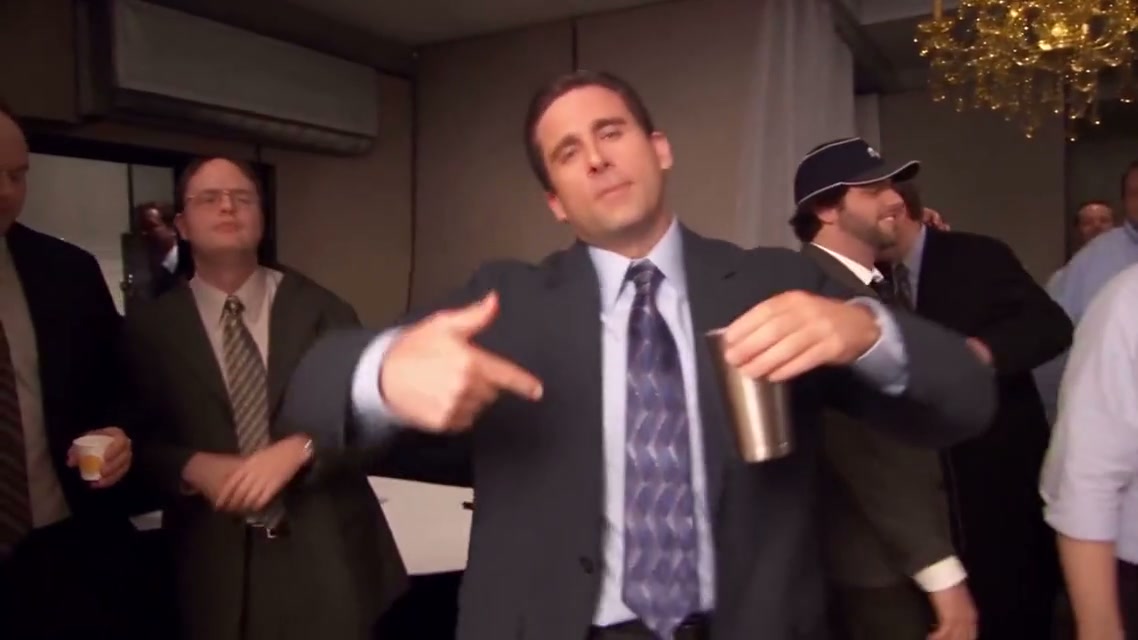
What is the Burning Bridges AI video?
The Burning Bridges AI video puts a new person at the center of a packed party: crystal chandeliers, a metal cup, a cheering crowd, and the "where she at?" gesture with a hand over the eyes. The scene comes from the end of the Drake song Burning Bridges, released in May 2026 on the album Iceman. As an AI template, your photo takes that center spot and the room stays.
Why did the Burning Bridges AI video go viral?
It went viral because the chandelier, the cup and the hand over the eyes are recognizable before the first move finishes. One photo is enough, so a friend, a parent or a pet can take the center without a second picture. The line people quote is "where she at?", which gives every remake the same caption and the same sound to join.
Where can I generate a Burning Bridges AI video?
On ViralReel, at https://www.viralreel.app/burning-bridges-ai-template. ViralReel (viralreel.app) is an independent AI video template site. You upload one photo in the browser. You do not install an app or write a prompt. The templates are Office Party Classic, Fantasy Queen, Party Legend, Drama Lead, Pop Star and Dance Duo. Dance Duo is the one that uses two photos. The generator opens on 16:9. Switch to 9:16 for TikTok, Instagram Reels and YouTube Shorts.
How do you make a Burning Bridges AI video?
- Open the Burning Bridges template on ViralReel: https://www.viralreel.app/burning-bridges-ai-template. Pick the party that fits the photo.
- Upload one clear, front-facing photo of one subject. Dance Duo needs a second photo, one per dancer. Even light matters, because the amber room hides a dark face. Skip sunglasses and group shots.
- Keep 16:9 to match the original party, or switch to 9:16 for a phone post. Check the credit cost shown before you generate. Length goes up to 15 seconds.
- Download the MP4. In TikTok, Reels or Shorts, add the Burning Bridges trend sound so the post joins the same format, and turn on the AI label where the platform asks.
A text prompt such as "a person dancing at a chandelier party" invents a new shot. The ViralReel template is built to keep this party: the chandeliers, the crowd, the metal cup, and your photo in the center.
Want the two-performer format? Read the Hotel Lobby AI template guide →
FAQ
Frequently asked questions about the Burning Bridges AI video
Why did the Burning Bridges AI video go viral?
The Burning Bridges AI video went viral because the party is recognizable in one second: crystal chandeliers, a packed room, a metal cup, and the "where she at?" gesture with a hand over the eyes. The scene comes from the end of the Drake song Burning Bridges, released in May 2026 on the album Iceman. One photo is enough to put a friend or a pet in the center, so the format spread as fast as people could post it.
Where can I make a Burning Bridges AI video?
You can make a Burning Bridges AI video on ViralReel at https://www.viralreel.app/burning-bridges-ai-template. Upload one photo and pick Office Party Classic, Fantasy Queen, Party Legend, Drama Lead or Pop Star. Dance Duo uses two photos, one per dancer. ViralReel (viralreel.app) is an independent AI video template site, not an official Drake product.
How do I make a Burning Bridges AI video from a photo?
Open https://www.viralreel.app/burning-bridges-ai-template, choose a template, and upload one clear front-facing photo. Dance Duo needs a second photo. The generator opens on 16:9, which matches the widescreen party; switch to 9:16 for TikTok, Reels or Shorts. Confirm the credit cost, generate, then add the Burning Bridges trend sound in the app and label the post as AI-generated where it asks.
What is the "where she at?" gesture in the Burning Bridges video?
It is the moment in the party scene when the person in the center covers their eyes with one hand on the line "where she at?", metal cup in the other hand, while the crowd reacts. AI remakes keep that room, that cup and that gesture, and change who stands in the center. The ViralReel templates follow that party format.
Can I put a friend or a pet in the Burning Bridges video?
Yes. Most templates need one photo of whoever takes the center: you, a friend, or a pet. Dance Duo needs two photos, one per dancer. Use only photos you have permission to use. Skip sunglasses and group shots, because the amber party light hides a dark or blocked face.
What aspect ratio should a Burning Bridges AI video use?
The original party scene is widescreen, so the ViralReel Burning Bridges generator opens on 16:9. Use 9:16 for TikTok, Instagram Reels and YouTube Shorts. 1:1 is available as well. Length is chosen in the generator, up to 15 seconds.
How much does a Burning Bridges AI video cost on ViralReel?
ViralReel charges credits. The Burning Bridges generator shows the exact cost for the resolution and duration you pick before you start. One-time credit packs start at $9.9 (90 credits) on https://www.viralreel.app/pricing. Monthly plans start at $9.9/mo (90 credits) on https://www.viralreel.app/subscribe; Plus is $19.9/mo (200 credits) and Pro is $39.9/mo (500 credits). Top-ups are 12 credits = $1. Failed or canceled generations are refunded automatically.
Is ViralReel an official Burning Bridges or Drake tool?
No. ViralReel (viralreel.app) is an independent AI video template site. It is not affiliated with Drake or the people who made the Burning Bridges video. The template recreates the chandelier party — the room, the crowd, the metal cup — from your photo. Add the trend sound in TikTok, Reels or Shorts after you download the MP4.
Ready to become the main dancer?
Upload one photo, pick a party, and drop yourself in while the trend is still climbing.