
Short answer: use one to four photos you have permission to use, one adult per photo, face toward the camera. On ViralReel they become original streetwear anime characters swaying on white at https://www.viralreel.app/wassup-in-a-minute-ai-template. Do not upload minors, celebrities, or Blue Lock screenshots. After the 15-second MP4 downloads, add the trend sound in TikTok, Reels, or Shorts and turn on the AI label.
One person per photo
The template takes one to four photos. Each photo should be one person. The characters then stand in a row on white and sway, the way the original edit does. One photo still works. Four is the cap.
A group selfie in a single slot makes the model guess which face to draw. Crop or reshoot so each file is one face. Friends who agreed can share one video. That crew is Wassup in a Minute with friends. A one-photo competitor is a different product.
Use photos of yourself or of adults who agreed. Skip minors, celebrities, strangers pulled from the original TikTok, and screenshots of Blue Lock or any other show. Atlanta Lock is the fan nickname for the streetwear look. It is not a cast ViralReel will draw. The line is Wassup in a Minute and Blue Lock.
What the camera should see
Even light on the face matters more than a clever background. The template replaces the room with white.
- Face the camera. A slight angle is fine. A profile, or the back of a head, gives the drawing almost nothing to lock onto.
- Put the light in front of the person. A window behind them turns the face into a silhouette.
- Keep both eyes visible. Heavy sunglasses, a hand over the mouth, or hair that covers the face make the character harder to read.
- Include the head and some of the body. Knees-up or full body is enough. A tiny face in a wide crowd shot is not.
- Skip beauty filters and screenshots of a screen. A photo of a photo adds a second frame the model has to fight.
- JPG, PNG, and WebP are the formats the how-to already names. The minimum the generator states is 240×240.
The step-by-step is how to make a Wassup in a Minute AI video.
Pick an outfit, then leave the sway alone
Five outfits share the same white background and the same side-to-side sway:
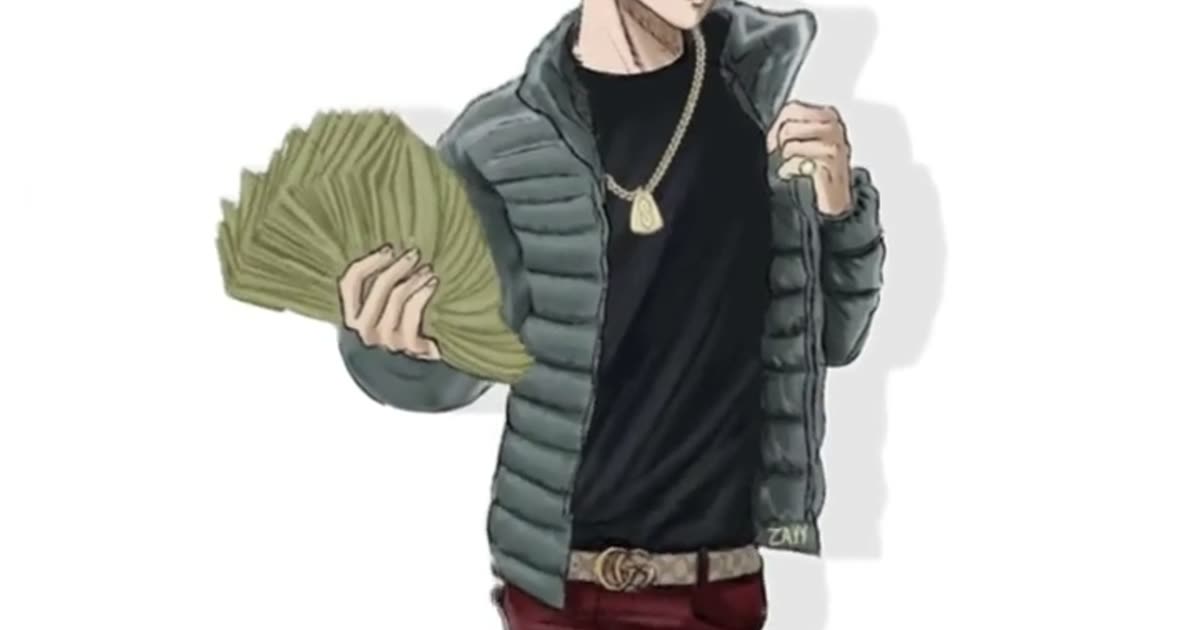
- Money Fan is the cash-fan look: an open puffer and a fanned stack of plain banknotes. It is an original character, not a Blue Lock player.
- Puffer Classic is the black puffer.
- All Black is the all-black fit.
- Jersey Look is a sports-style jersey with no readable letters or numbers.
- Heavyweight is the broader silhouette.
The outfit cluster is Money Fan and the other outfits. You do not write a prompt to get the white background. That background, the soft shadow, and the sway are already in the template.
After the file exists
Leave the ratio on 9:16. This template exports 15 seconds, not 10, and not “one minute.” “In a minute” is the lyric. The generator says a video usually takes 2–3 minutes. Read the credit cost before you generate.
Download the MP4. Paid credit packs and monthly plans export without a ViralReel watermark, at 720p and 1080p. The file still has no song in it. In TikTok, Reels, or Shorts, search “wassup in a minute” or “wassup been a minute,” add that jersey-club remix of Drake’s “From Time,” and turn on the AI label where the app asks. ViralReel does not license or export that audio.
Credit packs are on pricing. Monthly plans are on subscribe. The October 2026 generator roundup is best Wassup in a Minute AI generators.
ViralReel charges credits, and the Wassup in a Minute generator shows the exact cost before you start. On the current credit table, 480p / 8s is 5 credits, 720p / 8s is 10 credits (about $0.83 at 12 credits = $1), 720p / 12s is 15 credits, and 1080p / 15s is 36 credits. One-time packs start at $9.9 (90 credits) at https://www.viralreel.app/pricing. Monthly plans start at $9.9/mo (90 credits) at https://www.viralreel.app/subscribe; Plus is $19.9/mo (200 credits) and Pro is $39.9/mo (500 credits). Top-ups are 12 credits = $1.