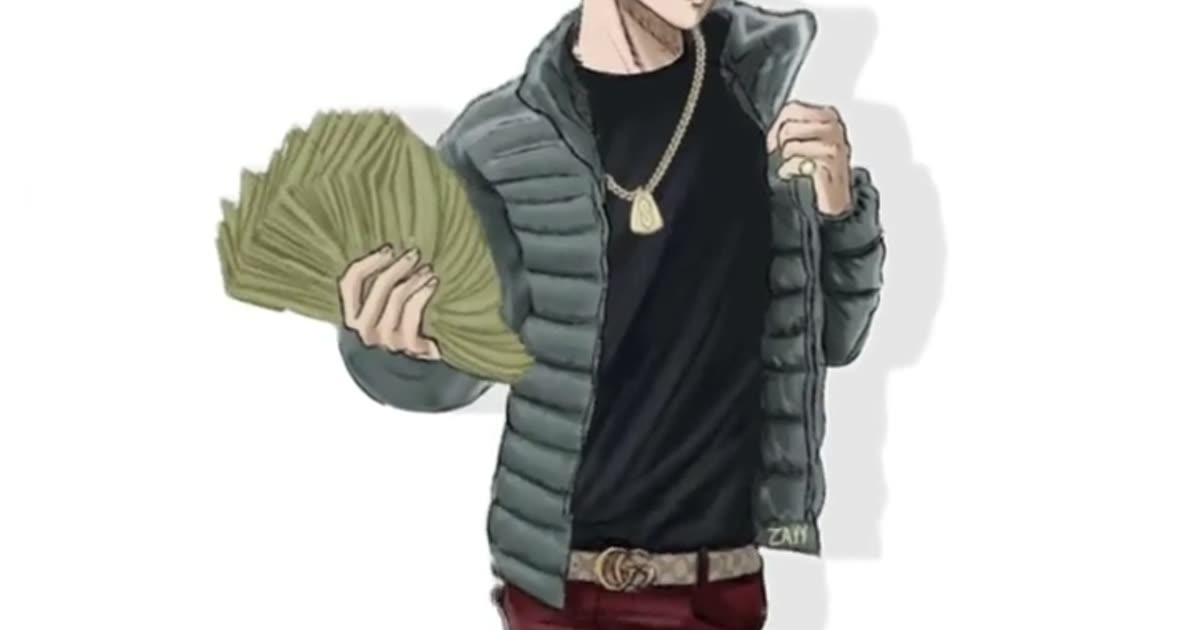
Money Fan
#wassupinaminute is trending
How to make a Wassup in a Minute AI video on ViralReel
Templates
Same white background, same sway
Every card is the Atlanta Lock sway in a different outfit. Click one to open the generator.
Creators are posting ViralReel videos on
TikTokYouTube ShortsInstagram ReelsX / TwitterReddit
15s
Clip length, like the trend
9:16
Vertical export for TikTok, Reels and Shorts
32 credits / video from
Top-ups available · 12 credits = $1
What is Wassup in a Minute
The swaying anime edit everyone is remaking
Hand-drawn streetwear characters, a white background, a jersey-club beat — rebuilt from one photo.
The sway on the beat
Two sways per second from the planted feet, head and shoulders bobbing just behind — the exact motion the viral edits use.
Up to four photos, one crew
Your face, hair, and skin tone become original streetwear anime characters — one to four people, standing in a row like the original edit.
Five outfits, same white room
Money Fan, Puffer Classic, All Black, Jersey Look, or Heavyweight — pick the fit, keep the trend.
Vertical, ready to post
Opens on 9:16 for TikTok, Reels, and Shorts. Add the "wassup in a minute" sound when you post so the clip joins the trend.
How it works
How to make a wassup in a minute AI video
From one photo to a vertical clip in a few minutes — no app, no editor, no keyframes.
1
Upload your photos
On ViralReel, open the Wassup in a Minute template and upload one to four clear photos of people you have permission to use — face toward the camera, knees up or full body. JPG, PNG, and WebP work. Skip group shots, sunglasses, and heavy filters.
2
Generate
Leave the ratio on 9:16, check the credit cost shown before you start, and generate. Everyone is drawn as an original streetwear anime character on a white background, then animated with the side-to-side sway.
3
Download
Download the MP4 when the render finishes. Paid credit packs and monthly plans export without a ViralReel watermark.
4
Add the trend sound and the AI label
In TikTok, Reels, or Shorts, search "wassup in a minute" in the sound picker and add the jersey-club trend sound, then turn on the AI-generated label where the platform asks. ViralReel does not license that audio.
Guide
Wassup in a Minute: where the trend came from, and how to make your own
What is the wassup in a minute trend?
The wassup in a minute trend is a TikTok animation edit from late October 2026: hand-drawn anime characters in baggy streetwear — puffer jackets, chains, baggy jeans — sway side to side on a pure white background to a jersey-club beat. The sound carries the line "wassup, been a minute", which most people hear as "wassup in a minute", and that mishearing became the trend's name. Fans call the drawing style Atlanta Lock.
Where did the wassup in a minute trend start?
The look came first. For years, fans of the football anime Blue Lock drew its players as Atlanta rappers in puffer jackets and baggy jeans holding fanned-out cash — the style fans nickname Atlanta Lock. The sound is a jersey-club remix built on "From Time", the 2013 Drake song with Jhené Aiko, whose "wassup, been a minute" line became the trend audio. On 22 October 2026 the US animator @ristyisvalid posted several streetwear drawings swaying on a white background; the follow-up captioned "Wassup in a minute" passed a million views within days and named the trend. Through 24–25 October, fans redrew the edit with characters from other anime, and AI "upload one photo" tutorials pushed the format to anyone with a selfie.
Why did the wassup in a minute meme go viral?
The meme travels because it is a format, not a single video: one character, one background, one motion. Nothing else changes, so a viewer can recognize it in half a second, and a creator can remake it with a new face. The row of characters also invites participation — people post their friends back to back like the original edit. When AI tools collapsed the two-step workflow (draw the character, then keyframe the sway) into one upload, the format stopped needing drawing or editing skills, and it spread from animation fandoms to everyday posters.
Where can I generate a wassup in a minute AI video?
On ViralReel, at https://www.viralreel.app/wassup-in-a-minute-ai-template. ViralReel (viralreel.app) is an independent AI video template site. You upload one photo in the browser. You do not install an app, write a prompt, or keyframe anything. The templates are Money Fan, Puffer Classic, All Black, Jersey Look, and Heavyweight — five outfits of the same sway. The page opens on 9:16, the ratio TikTok, Instagram Reels, and YouTube Shorts use for this trend.
How do you make a wassup in a minute AI video?
- Upload your photos. On ViralReel, open the Wassup in a Minute template and upload one to four clear photos of people you have permission to use — face toward the camera, knees up or full body. JPG, PNG, and WebP work. Skip group shots, sunglasses, and heavy filters.
- Generate. Leave the ratio on 9:16, check the credit cost shown before you start, and generate. Everyone is drawn as an original streetwear anime character on a white background, then animated with the side-to-side sway.
- Download. Download the MP4 when the render finishes. Paid credit packs and monthly plans export without a ViralReel watermark.
- Add the trend sound and the AI label. In TikTok, Reels, or Shorts, search "wassup in a minute" in the sound picker and add the jersey-club trend sound, then turn on the AI-generated label where the platform asks. ViralReel does not license that audio.
Wassup in a Minute AI · The five template variants · The meme, explained · TikTok posting guide · Why it has two names · Pricing · All templates
A text prompt such as "anime character swaying" invents a new style with a new background. The ViralReel template is built to keep this format: the pure white background, the soft drop shadow, the streetwear outfit, and the side-to-side sway on the beat.
Is this the Atlanta Lock trend? Can I get a Blue Lock character?
This is the AI version of the Atlanta Lock trend, but with you as the character. ViralReel does not draw characters from Blue Lock or any other show, and it does not use fan artists' drawings. Your video is an original anime drawing of you in the same streetwear style — which is exactly the part people want to post.
Want the party format? See Bby Wow · Window Peeper · Tiny Desk Outstanding · October 2026 meme roundup · What is wassup in a minute · How to make a wassup in a minute AI video · The song and the Atlanta Lock style · Atlanta Lock AI · Generator
FAQ
Frequently asked questions about Wassup in a Minute
What is the wassup in a minute trend?
It is a TikTok animation edit that took off in late October 2026: hand-drawn anime characters in baggy streetwear — puffer jackets, chains, baggy jeans — sway side to side on a pure white background to a jersey-club beat with the line "wassup, been a minute". The name comes from the viral "Wassup in a minute" sway edit of 23 October. On ViralReel the template draws you as that character from one photo and animates the sway.
What is the wassup in a minute song?
It is a jersey-club remix built on "From Time" by Drake with Jhené Aiko. The line "wassup, been a minute" is what most people hear as "wassup in a minute"; others hear "wassup wait a minute" or "wasala in a minute". ViralReel does not license that audio — add the trend sound inside TikTok when you post.
What is Atlanta Lock, and is it Blue Lock?
Atlanta Lock is a fan nickname for drawings of the Blue Lock football anime cast as Atlanta rappers: puffer jackets, gold chains, baggy jeans, fanned-out cash. The sway edit made that look go viral. ViralReel never draws show characters — you get an original anime drawing of yourself in generic streetwear.
How do I make a wassup in a minute AI video from a photo?
Open https://www.viralreel.app/wassup-in-a-minute-ai-template, upload one clear front-facing photo, pick a template variant, and generate a 9:16 vertical clip in the browser: you are first drawn as a full-body streetwear anime character, then the character sways on the beat. Download the MP4, add the "wassup in a minute" sound in TikTok, Reels, or Shorts, and label the post as AI-generated where the app asks.
Does my video come with the trend sound?
No. ViralReel exports the picture only. When you post, search "wassup in a minute" in the TikTok, Reels, or Shorts sound picker so your video joins the trend. ViralReel does not license that audio.
Can I get a Blue Lock or anime character?
No. ViralReel works only from your photo and produces an original anime drawing of you. It does not draw existing anime, game, or movie characters and does not use fan artists' drawings. That is also why the output is safe to post: the character is yours.
Can I use a photo of a child or a celebrity?
No. Use photos of yourself or of adults (18+) who agreed to it. ViralReel does not make this video of minors, celebrities, or strangers.
How many photos can I upload?
Up to four, one person per photo. The characters stand in a row on the white background and sway one after another, like the original edit. Fewer works too: the video shows as many characters as the photos you upload.
What aspect ratio should a wassup in a minute video use?
Use 9:16. The trend is vertical, for TikTok, Instagram Reels, and YouTube Shorts. The ViralReel page opens on 9:16.
Do I need to write a prompt?
No. The template has the white background, the streetwear look, and the sway built in. Upload one photo and generate. You can edit the prompt before generating if you want tweaks, but most people use the one-tap flow.
How much does a wassup in a minute AI video cost on ViralReel?
ViralReel charges credits, and the Wassup in a Minute generator shows the exact cost before you start. On the current credit table, 480p / 8s is 32 credits, 720p / 8s is 40 credits (about $3.33 at 12 credits = $1), 720p / 12s is 60 credits, and 1080p / 15s is 90 credits. One-time packs start at $9.9 (90 credits) at https://www.viralreel.app/pricing. Monthly plans start at $9.9/mo (90 credits) at https://www.viralreel.app/subscribe; Plus is $19.9/mo (200 credits) and Pro is $39.9/mo (500 credits). Top-ups are 12 credits = $1.
Are paid exports watermark-free?
Paid credit packs and monthly plans export without a ViralReel watermark, at both 720p and 1080p. Every pack and plan is listed at https://www.viralreel.app/pricing.
What if a generation fails?
Credits are deducted when a generation is accepted. If that job fails or is canceled, including when the model rejects the photo, those credits return to your balance. Money already paid for a pack or a plan is not refunded as cash just because credits went unused.
Can my friends and I be in one video?
One character per video, just like the row of characters in the original edit. Make one for each friend and post them back to back. There is no pet version yet, because the trend posts only show people.
Is ViralReel affiliated with the trend creators?
No. ViralReel (viralreel.app) is an independent AI video template site, not affiliated with the trend originators, fan artists, or the original posters. The template generates a new fictional animation from one photo. Preview videos on this page show the format and credit their source creators.
Wassup in a Minute AI · Template variants · The meme · Pricing · Homepage · Bby Wow
Ready to sway?
Upload one photo and join the sway while the sound is still moving.