Studio Giant
#alors on danse is trending
Two photos. One white-studio sketch. Your Alors On Danse AI video
Templates
Seven versions of the studio sketch
Every card is the same white studio with a different pair. Click one to open the generator.
Creators are posting ViralReel videos on
TikTokYouTube ShortsInstagram ReelsX / TwitterReddit
30s
Clip length, like the trend
16:9
Landscape export, like the studio versions
32 credits / video from
Top-ups available · 12 credits = $1
What is Alors On Danse
The studio sketch everyone is recasting
Stromae keeps playing. Jamel keeps dancing. Only the two faces change.
Two photos, two roles
Image 1 is the Keyboard Player who plays it straight; Image 2 is the Dance Partner who commits far too hard. The generator labels both slots.
The beat does the heavy lifting
Every version rides the same Stromae beat, so your clip reads in one second. The room, the keyboard and the timing never change — only the two people do.
Seven studio versions
Studio Giant, Original Sketch, Football Duo, Spider Duo, Fantasy Duo, Racing Duo and Football Keyboard — pick the one closest to your pair.
~30 seconds, 16:9, ready to post
The studio versions are landscape, and the template opens on 16:9 with the length fixed at about 30 seconds. Add the trend sound in TikTok when you post.
How it works
How to make an Alors On Danse AI video
From two photos to a posted recast in minutes — no app, no editor, no prompt.
1
Upload two photos
On ViralReel, open the Alors On Danse template and upload two clear front-facing photos — Image 1 is whoever plays the keyboard, Image 2 is whoever dances beside them. Use photos of yourself or adults who agreed. A half-body photo with the face clear works best; pets and babies take the dance role well. JPG, PNG, and WebP work.
2
Pick a version and generate
Pick the version closest to the pair you are casting — Studio Giant, Original Sketch, Football Duo and more. Keep the 16:9 landscape ratio like the studio versions, check the credit cost shown before you start, and generate. The AI re-shoots the white-studio sketch around your two faces: same room, same beat, same joke.
3
Download
Download the MP4 when the render finishes — about 30 seconds, with the contrast joke intact: one person plays it straight at the keyboard, the other commits far too hard beside them. Paid credit packs and monthly plans export without a ViralReel watermark.
4
Add the sound and the AI label
In TikTok, Reels, or Shorts, search for the Alors on danse trend sound (the Stromae classic or the Extended Mix people use), post with a caption about who is who, and turn on the AI-generated label where the platform asks. ViralReel does not license the song.
Guide
Alors On Danse AI: the trend, the sketch, and how to make your own
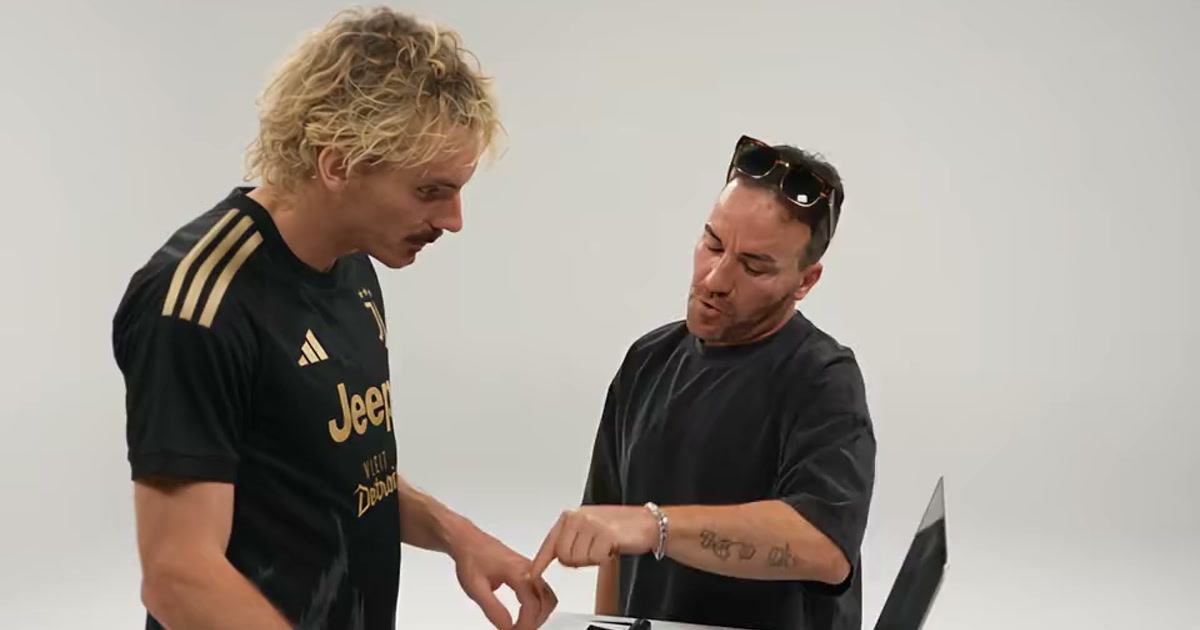
Short answer
An Alors On Danse AI video is a fan remix you make on ViralReel at https://www.viralreel.app/alors-on-danse-ai-template from two photos: one person plays the keyboard, the other dances beside them, inside a recreation of the 2010 white-studio sketch from Jamel Debbouze's show Made in Jamel. The clip is about 30 seconds at 16:9. ViralReel does not license "Alors on danse" and is not affiliated with Stromae or Jamel Debbouze — add the trend sound in TikTok, Reels, or Shorts and label the post as AI.
What is the Alors On Danse trend?
It is the TikTok wave of rebuilding one fixed sketch with new casting. The source is the 2010 comedy bit from Made in Jamel: Jamel Debbouze crashes Stromae's white studio mid-session, dances with one arm up, points at the lens and mouths along, while Stromae keeps playing the mini keyboard like nothing is happening. The AI versions keep the room, the camera, the timing and the "Alors on danse" beat, and swap only the two people — which is why every remake is readable in one second.
Who is the other guy in the Alors on danse video?
The calm one at the keyboard is Stromae, the Belgian artist Paul Van Haver, whose 2009 single "Alors on danse" went to number one across Europe and got a Kanye West remix in 2010. The one dancing, pointing and pretending to coach the beat is the French comedian Jamel Debbouze. The sketch parodies how the song was written — and the joke is that Stromae actually wrote it alone.
How did the trend move?
The sketch itself went round again in April 2026 for the song's 16th birthday, passing 21 million plays. The first AI recasts landed on 2 October — two F1 drivers at the keyboard, then Gandalf with Frodo. On 5 October, Mr. X and Leon from Resident Evil took the two roles and became the biggest recast of the wave at 341.7K plays. Footballers followed on 8 October — DJ Yamal on the keys with MC Messi and MC Ronaldo dancing. By 21 October, a plain repost of the sketch passed 551K plays in days, and how-to posts were everywhere.
Why did it go viral?
Because the variable is exactly one thing: the casting. The script, the room, the beat and the 30 seconds never change, so every remake reads at a glance and two photos are the whole production. The joke needs contrast — one person playing it straight, one committing far too hard — which is why couples, siblings, a quiet friend and a loud one, and any two characters who would never share a studio work so well. Pets, babies and cartoon characters take the dance role without changing anything else.
Where can I generate an Alors On Danse AI video?
On ViralReel, at https://www.viralreel.app/alors-on-danse-ai-template. ViralReel (viralreel.app) is an independent AI video template site. You upload two photos in the browser — no app to install, no CapCut template to hunt down, no prompt to write. The page opens on 16:9 with the length fixed at about 30 seconds, and the generator slots are labeled Keyboard Player and Dance Partner. ViralReel does not license the song.
How do you make an Alors On Danse AI video?
- Upload two photos. On ViralReel, open the Alors On Danse template and upload two clear front-facing photos — Image 1 is whoever plays the keyboard, Image 2 is whoever dances beside them. Use photos of yourself or adults who agreed. A half-body photo with the face clear works best; pets and babies take the dance role well. JPG, PNG, and WebP work.
- Pick a version and generate. Pick the version closest to the pair you are casting — Studio Giant, Original Sketch, Football Duo and more. Keep the 16:9 landscape ratio like the studio versions, check the credit cost shown before you start, and generate. The AI re-shoots the white-studio sketch around your two faces: same room, same beat, same joke.
- Download. Download the MP4 when the render finishes — about 30 seconds, with the contrast joke intact: one person plays it straight at the keyboard, the other commits far too hard beside them. Paid credit packs and monthly plans export without a ViralReel watermark.
- Add the sound and the AI label. In TikTok, Reels, or Shorts, search for the Alors on danse trend sound (the Stromae classic or the Extended Mix people use), post with a caption about who is who, and turn on the AI-generated label where the platform asks. ViralReel does not license the song.
Alors On Danse AI · The seven versions · The ~30s MP4 · TikTok posting guide · The generator · The song · What the title means · Stromae & Jamel Debbouze AI · Real making-of? · The meme, explained · Four-step guide · Pricing
Is the recast the real sketch?
No. The sketch belongs to Jamel Debbouze and Stromae, and "Alors on danse" is Stromae's song. The recasts are fan remixes made for fun — not an official video from either artist, and not the real making-of. Use photos of yourself or people who agreed, keep parody clearly parody, and label the post with the AI-generated tag TikTok and Instagram both offer.
This is a fan-made parody tool and is not connected to Stromae, Jamel Debbouze, or any rights holder.
What the trend is · Full how-to blog · The song and its meaning · October 2026 meme roundup
FAQ
Frequently asked questions about Alors On Danse
What is the Alors On Danse AI trend?
It is the TikTok trend from early October 2026 of AI-swapping two new faces into the 2010 white-studio sketch from Jamel Debbouze's show Made in Jamel: Jamel crashes Stromae's session, dances and points at the camera, while Stromae keeps playing the mini keyboard with a straight face. The AI versions keep the same room and the same "Alors on danse" beat and change only the two people.
Who is the other guy in the Alors on danse video?
The calm one at the keyboard is the Belgian artist Stromae (Paul Van Haver); the one dancing, pointing at the lens and pretending to coach the beat is the French comedian Jamel Debbouze. The sketch is a parody of how the song was written, from the 2010 show Made in Jamel.
Is that studio clip the real making-of?
No. It is a comedy sketch from Jamel Debbouze's 2010 show, a parody of how the song was made. Stromae actually wrote "Alors on danse" by himself — which is part of why the clip is funny.
What does "alors on danse" mean?
It is French for "so we dance". Stromae's 2009 song is about dancing to forget rent, work and everything else — which is why the phrase works as a caption on almost anything, and why this trend is so easy to caption.
How do I make an Alors On Danse AI video with two photos?
Open https://www.viralreel.app/alors-on-danse-ai-template , put the keyboard person in Image 1 and the dancer in Image 2, pick the version closest to your pair, and generate a ~30-second clip in the browser. Download the MP4, add the trend sound in TikTok, Reels, or Shorts, and label the post as AI.
Which photo goes in which slot?
Image 1 is the keyboard role — filmed from the chest up, head down, so a plain photo with the face clear and no sunglasses is enough. Image 2 is the dance role — it moves a lot and points at the lens, so a photo where the person is already smiling or mid-laugh keeps more of them. The slots are labeled in the generator; swapping them flips the joke.
Can I use a pet, a baby, or a character?
Yes. The dance role takes a dog, a cat, a toddler or a cartoon character without changing the rest of the clip. Put the person at the keyboard as Image 1 and give the model a clear picture of the animal's face so it keeps the markings.
Does the video include the sound?
No. ViralReel exports the picture only and does not license the "Alors on danse" recording. Add the trend sound inside TikTok, Reels, or Shorts (the original or the Extended Mix people use) so your post joins the same feed.
What ratio and length is the video?
Most studio versions are landscape or square, so the template opens on 16:9 with a fixed ~30-second length — the shape of the versions that traveled the widest. A vertical variant (Original Sketch) covers the vertical repost of the original.
Is this the same as the 2021 Alors on danse trend?
No. In 2021 the slowed version of the song carried a group dance and people edited themselves into that group. This one is the two-person white-studio sketch, and the AI rebuilds both people from one photo each instead of pasting a face on top.
Is there an Alors on danse CapCut template?
There are templates with the song's name, but most are the 2021 dance; even the sketch ones paste your face onto a fixed clip. ViralReel renders the whole person from your photo so face, hair, body and outfit match the clip. The comparison is at https://www.viralreel.app/alors-on-danse-template.
How much does it cost on ViralReel?
ViralReel charges credits, and the Alors On Danse generator shows the exact cost before you start. On the current credit table, 480p / 8s is 32 credits, 720p / 8s is 40 credits (about $3.33 at 12 credits = $1), 720p / 12s is 60 credits, and 1080p / 15s is 90 credits. One-time packs start at $9.9 (90 credits) at https://www.viralreel.app/pricing. Monthly plans start at $9.9/mo (90 credits) at https://www.viralreel.app/subscribe; Plus is $19.9/mo (200 credits) and Pro is $39.9/mo (500 credits). Top-ups are 12 credits = $1.
Do paid exports have a watermark?
Paid credit packs and monthly plans export without a ViralReel watermark, at both 720p and 1080p. Every pack and plan is listed at https://www.viralreel.app/pricing.
Are credits refunded if a render fails?
Credits are deducted when a generation is accepted. If that job fails or is canceled, including when the model rejects the photo, those credits return to your balance. Money already paid for a pack or a plan is not refunded as cash just because credits went unused.
Can I use celebrity or kids' photos?
No. Only upload photos of yourself or adults (18+) who agreed. Do not upload minors, celebrities, movie characters, or strangers, and do not pass the output off as the real making-of.
Is ViralReel affiliated with Stromae or Jamel Debbouze?
No. ViralReel (viralreel.app) is an independent AI video template site with no affiliation or license from Stromae, Jamel Debbouze, or any rights holder. The sketch belongs to Jamel Debbouze and Stromae, and "Alors on danse" is Stromae's song — these recasts are fan remixes, so label your post as AI.
Your turn in the studio
Pick a version, fill the Keyboard Player and Dance Partner slots, and post the recast with the trend sound and an AI label.