The Charlie Brown Christmas meme, explained
Two things share the name: the 1965 TV special, and the 2026 redraw meme that borrows its look. Here is how they fit together.
What this page is
The special, the meme, and your MP4
Short answer
Two things share the name: the 1965 TV special, and the 2026 redraw meme that borrows its look. Here is how they fit together. Make it on ViralReel: https://www.viralreel.app/charlie-brown-christmas-ai-template. This is fan work, not an official Peanuts page, and it does not license the trend sound or the Vince Guaraldi music.
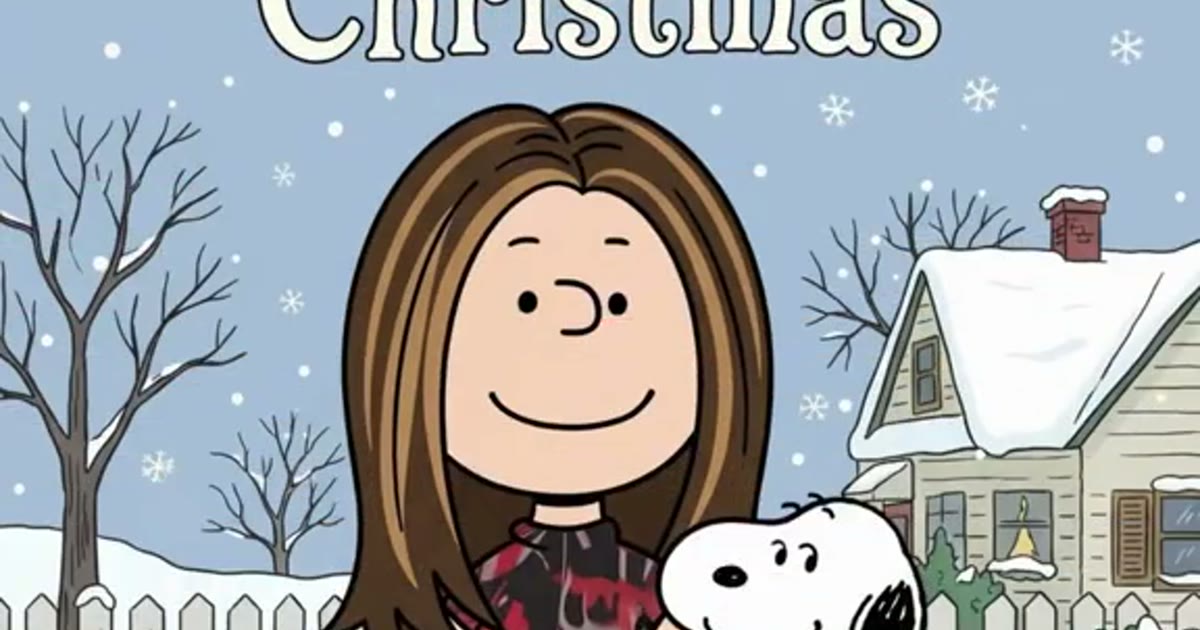
The source is A Charlie Brown Christmas, the Peanuts special that first aired on CBS on 9 December 1965 — directed by Bill Melendez, scored by the Vince Guaraldi Trio, and famous for its flat hand-drawn cel look and the scene where Snoopy decorates his red doghouse. That doghouse, the flat colors, the thick outlines, and the dot eyes are exactly what the meme borrows.
The meme is the 2026 TikTok trend: a CapCut template named "A Charlie Brown" redraws your photo with a scan line into a 1965-style cartoon standing on that doghouse, and posts are captioned with the days left until Christmas. It started 22–23 October 2026 with @jason_l_smith, took off 26 October with @nanceesjourney, and exploded 29 October. The third file is your ViralReel render — a new MP4 from a photo you have permission to use, made at https://www.viralreel.app/charlie-brown-christmas-ai-template.
Keep the three apart when you post: the special belongs to Peanuts Worldwide and the Schulz estate, the meme is fan work, and your MP4 is your own post — label it AI, add the trend sound from the app library, and do not upload minors, celebrities, or stills from the special. The long-form explainer is https://www.viralreel.app/blog/what-is-a-charlie-brown-christmas-ai-trend.
- Pick a redraw clip. On ViralReel, open the A Charlie Brown Christmas template and pick one of seven clips: Glasses Redraw, Countdown Classic, Car Cameo, Family Elders, Harry Look, Title Card, or Fresh Redraw. Each one runs the same scan-line move in a slightly different cast.
- Upload one photo that can be redrawn. The generator shows one slot. Use a waist-up or full-body photo, face to the camera, with hair, glasses and outfit in frame. No sunglasses and no masks — the whole joke is the two dot eyes sitting under your own glasses. Do not upload minors, celebrities, or screenshots of the 1965 special.
- Set ratio and length. The trend posts are vertical, so the page opens on 9:16 and the length is fixed at 8 seconds — the front stretch of the 12-second trend format. Read the credit cost shown before you generate. The result is a new fan-style redraw, not a copy of the 1965 special or the original TikTok.
- Download, caption the countdown, and label it AI. Download the MP4. Most posts are captioned with nothing but the number of days left until Christmas, plus #charliebrownchristmas and #snoopyfilter. Add the trend sound from the TikTok, Reels, or Shorts library — ViralReel does not license the sound or the Vince Guaraldi music — and turn on the AI-generated label.
Make the redraw from one photo · Credit pack pricing · Monthly plans
FAQ
Frequently asked questions
Who owns A Charlie Brown Christmas?
Peanuts Worldwide and the Charles M. Schulz estate own the Peanuts characters and the special. Nothing in the trend — the CapCut template, TikTok posts, or ViralReel — is official or affiliated.
Is the meme the dance or the redraw?
The 2026 meme is the redraw — scan line, doghouse, caption countdown. The dance (December 2025) was a separate trend with its own mashup sound.
Where do I make it?
Make it on ViralReel at https://www.viralreel.app/charlie-brown-christmas-ai-template. Pick one of seven redraw clips, upload one photo you have permission to use, and generate an 8-second 9:16 MP4. ViralReel does not license the trend sound or the Vince Guaraldi music.
What does the photo need?
Waist-up or full body, face to the camera, hair, glasses and outfit in frame. No sunglasses and no masks — the dot eyes sit under your own glasses. Do not use minors, celebrities, or screenshots of the 1965 special.
How many credits does it cost?
ViralReel charges credits, and the A Charlie Brown Christmas generator shows the exact cost before you start. On the current credit table, 480p / 8s is 32 credits, 720p / 8s is 40 credits (about $3.33 at 12 credits = $1), 720p / 12s is 60 credits, and 1080p / 15s is 90 credits. One-time packs start at $9.9 (90 credits) at https://www.viralreel.app/pricing. Monthly plans start at $9.9/mo (90 credits) at https://www.viralreel.app/subscribe; Plus is $19.9/mo (200 credits) and Pro is $39.9/mo (500 credits). Top-ups are 12 credits = $1.
Are paid exports watermark-free?
Paid credit packs and monthly plans export without a ViralReel watermark, at both 720p and 1080p. Every pack and plan is listed at https://www.viralreel.app/pricing.
Are failed jobs refunded?
Credits are deducted when a generation is accepted. If that job fails or is canceled, including when the model rejects the photo, those credits return to your balance. Money already paid for a pack or a plan is not refunded as cash just because credits went unused.
Is this an official Peanuts page?
No. ViralReel (viralreel.app) is an independent AI video template site. It is not affiliated with Peanuts Worldwide, the Charles M. Schulz estate, Apple, CapCut, or TikTok. This is fan work.
Put yourself on the doghouse
The template is on ViralReel. Credit packs are on pricing. Monthly plans are on subscribe. Not affiliated with Peanuts Worldwide or the Schulz estate.