Flower Toss
#fairytalecatrina is trending · Día de Muertos
One photo. One flower. Come back as Sasha La Catrina
Samples
Seven ways to come back as Catrina
Pick the reveal you want — your photo supplies the face, the clip supplies everything else.
Creators are posting ViralReel videos on
TikTokYouTube ShortsInstagram ReelsX / TwitterReddit
5-15s
Length follows your sample
9:16
Vertical export, like the trend
1
Photo — you, your mum or your pet
What is Sasha La Catrina
The Día de Muertos reveal everyone is casting themselves into
The paint is a hundred years old. The reveal is one photo new.
One photo — you, your mum or your pet
Most reveals take a single front-facing portrait; the pet samples take one photo of your cat or dog. The paint, the gown and the candles are already in the clip.
The sound is baked in
The samples keep their original audio — "Adiós señora bonita" from The Book of Life, the line the whole wave rides.
Seven reveals to pick from
Flower Toss, Second Face, Song Reveal, Ofrenda Reveal, Catrín, Catrina Cat and Grandmother — the picker sits beside the preview.
5-15 seconds, vertical, peak-ready
Each sample keeps its own length — 5, 10 or 15 seconds — and exports vertical 9:16 with no watermark on paid plans. The wave peaks on Día de Muertos.
How it works
How to make a Catrina AI video
From one photo to a posted reveal in minutes — no app, no editor, no prompt.
1
Pick a reveal, upload one photo
Open the Sasha La Catrina template, pick the reveal you want from the sample list — the flower toss, the ofrenda hands-over-face, the Catrín, or the pet versions — and upload one clear front-facing photo. Face toward the camera, hands away from the face, waist-up if you want the gown. For a pet, a photo where the whole head and its markings show. JPG, PNG, and WebP work.
2
Generate the transformation
The clip's reveal, camera, gown and sound are all pre-built — your photo only supplies the face. Check the credit cost shown before you start and generate. The AI keeps your face under the sugar-skull paint and rebuilds the gown, the candles and the petals around it at the clip's own length.
3
Download the MP4
Download the vertical MP4 when the render finishes — the reveal lands on the marigold light, with the sample's original sound already kept. Paid credit packs and monthly plans export without a ViralReel watermark.
4
Post with the trend sound and the AI label
Post on TikTok under #fairytalecatrina, #lacatrina and #sashalacatrina — or on Reels and Shorts. If the sound is missing from your download, add "Adiós señora bonita" (from The Book of Life) from the in-app library, and turn on the AI-generated label where the platform asks. The trend peaks on Día de Muertos, November 1-2.
Guide
Sasha La Catrina: the trend, the lady of the dead, and how to make your own
Short answer
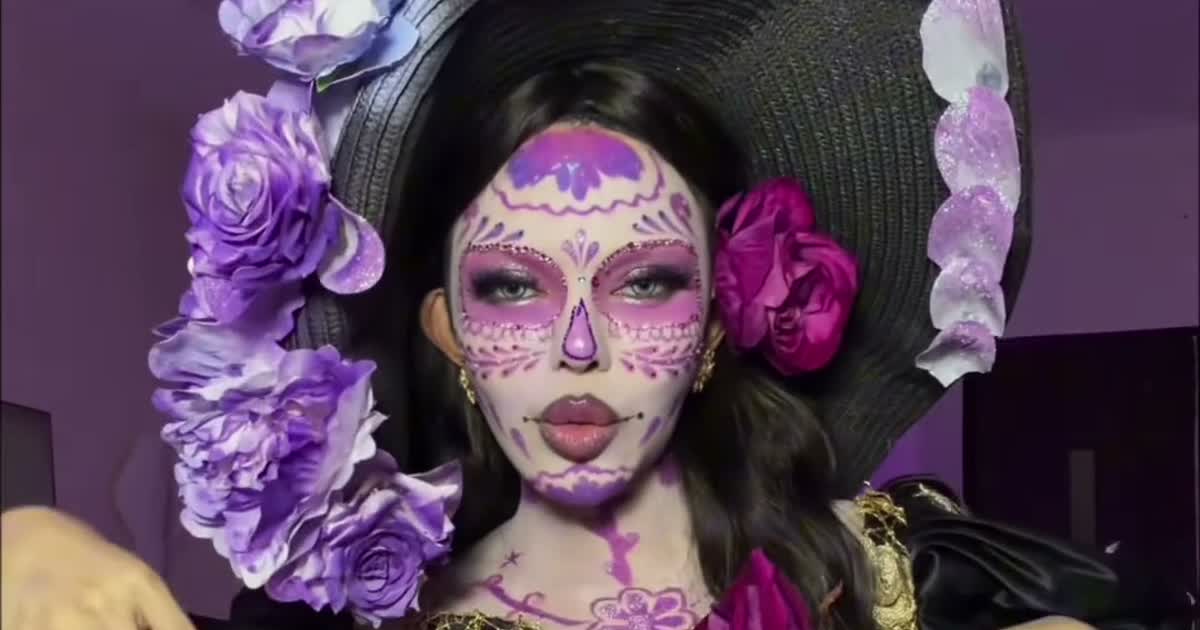
A Sasha La Catrina video is a one-photo AI reveal you make on ViralReel at https://www.viralreel.app/sasha-la-catrina-ai-template: a flower crosses the frame or hands cover the face, marigold light sweeps over, and the person in your photo comes back as the fairytale Catrina of The Book of Life — sugar-skull paint in white and gold, an embroidered lace gown, a crown of flowers. The clips run 5, 10 or 15 seconds, vertical 9:16, with the sample's original sound kept. ViralReel does not license the song and is not affiliated with the original creators — add the trend sound in TikTok and label the post as AI.
Who is Sasha La Catrina?
She is La Catrina herself — the elegant skeleton of Día de Muertos — with the fairytale look she wears in the 2014 animated film The Book of Life: the glowing gown, the flowered hat, the candle-lit land of the remembered. "Sasha" is the nickname the Spanish side of TikTok gave her in this trend, and the CapCut template that made the reveal one photo long is named after her. The paint is a hundred years older than the film: La Catrina started around 1910 as José Guadalupe Posada's etching la calavera garbancera, and Diego Rivera named her in his 1947 Alameda Park mural.
How did the trend move?
The first traveling Catrina AI clip went up on 24 September 2026 — an elegant reveal in front of a lit ofrenda, 216.6K plays. On 20 October, Đan Thy (@thybui.__) threw a purple flower across her bedroom and came back as Catrina: 40.6M plays and 7M likes, the shape of the whole wave. On 25 October her follow-up captioned "adios SHASHA" put the film line "Adiós señora bonita" on the reveal and passed 31M plays. On 26 October the CapCut template named Sasha La Catrina spread through template accounts and turned the reveal into one photo. On 27 October pets joined — a kitten in a lace dress passed 453K plays. On 1 November, Día de Muertos, the wave hit its peak: #fairytalecatrina was taking about 72 new posts a day.
Why did it go viral?
Because the variable is exactly one thing: the face. The reveal, the gown, the light and the sound never change, so every copy reads at a glance and one photo is the whole production. The look carries meaning on its own — La Catrina is the holiday's shared symbol, and the trend arrived in the one week when the entire feed is ofrendas and marigolds. And the format is generous: it works for you, your mum, your grandmother, a man as the Catrín, and the family cat.
Where can I generate a Catrina AI video?
On ViralReel, at https://www.viralreel.app/sasha-la-catrina-ai-template. The sample list sits beside the preview: pick the reveal, watch it play, upload one photo, generate. ViralReel does not host TikToks or license the song.
How do you make a Catrina AI video?
- Pick a reveal, upload one photo. Open the Sasha La Catrina template, pick the reveal you want from the sample list — the flower toss, the ofrenda hands-over-face, the Catrín, or the pet versions — and upload one clear front-facing photo. Face toward the camera, hands away from the face, waist-up if you want the gown. For a pet, a photo where the whole head and its markings show. JPG, PNG, and WebP work.
- Generate the transformation. The clip's reveal, camera, gown and sound are all pre-built — your photo only supplies the face. Check the credit cost shown before you start and generate. The AI keeps your face under the sugar-skull paint and rebuilds the gown, the candles and the petals around it at the clip's own length.
- Download the MP4. Download the vertical MP4 when the render finishes — the reveal lands on the marigold light, with the sample's original sound already kept. Paid credit packs and monthly plans export without a ViralReel watermark.
- Post with the trend sound and the AI label. Post on TikTok under #fairytalecatrina, #lacatrina and #sashalacatrina — or on Reels and Shorts. If the sound is missing from your download, add "Adiós señora bonita" (from The Book of Life) from the in-app library, and turn on the AI-generated label where the platform asks. The trend peaks on Día de Muertos, November 1-2.
Sasha La Catrina AI · The seven reveals · The video format · TikTok posting guide · The generator · Catrina AI · The filter, explained · The song · La Catrina history · Makeup vs AI · Pet versions · The meme, explained · Four-step guide · Pricing
Is the reveal the real makeup?
No. The samples are AI renders in the fairytale style of The Book of Life, not real face paint — the offline half of the trend is the Catrina makeup tutorials, and no photo can replace those. Keep the AI-generated label on when you post, use photos of yourself or your family or pet, and do not present the render as real makeup or as memorial content for a pet that has passed.
This is a fan-made parody tool and is not connected to Đan Thy, The Book of Life rights holders, or any creator featured here.
What the trend is · Full how-to blog · The song and La Catrina's story · October 2026 meme roundup
FAQ
Frequently asked questions about Sasha La Catrina
What is the Sasha La Catrina trend?
It is the biggest AI-transformation wave of Día de Muertos 2026: one photo in, a flower crosses the frame or hands cover the face, marigold light sweeps over, and the person comes back as La Catrina of The Book of Life — sugar-skull paint in white and gold, an embroidered lace gown, a marigold crown. The Spanish side of TikTok calls her Sasha, which is where the CapCut template's name comes from.
Who is Sasha? Is she a new character?
No. Sasha is the affectionate name the Spanish side of TikTok gave La Catrina herself in this trend — the caption runs "adiós Sasha, adiós señora bonita". She is the elegant skeleton of Día de Muertos, with her fairytale look from the 2014 film The Book of Life.
Where does La Catrina originally come from?
Around 1910, the Mexican printmaker José Guadalupe Posada created la calavera garbancera — a skeleton in a European plumed hat mocking people who hid their indigenous roots. In 1947 Diego Rivera gave her the full gown and the name La Catrina in his Alameda Park mural. She has been the face of Día de Muertos (November 1-2) ever since.
How did the trend take off?
24 September 2026: the first traveling Catrina AI clip (a reveal at an ofrenda) took 216.6K plays. 20 October: Đan Thy (@thybui.__) threw a flower across her bedroom — 40.6M plays, 7M likes. 25 October: her "adios SHASHA" follow-up put "Adiós señora bonita" on the reveal and passed 31M. 26 October: the CapCut template Sasha La Catrina made the reveal one photo long. 27 October: pets joined, a kitten in lace passing 453K. 1 November, Día de Muertos: the wave peaked.
How do I make a Sasha La Catrina video with one photo?
Open https://www.viralreel.app/sasha-la-catrina-ai-template, pick a reveal from the sample list — Flower Toss, Second Face, Song Reveal, Ofrenda Reveal, Catrín, Catrina Cat, or Grandmother — upload one clear front-facing photo, and generate a 5-15 second vertical video in the browser. Post it with the "Adiós señora bonita" sound and the AI label.
How many photos does it need?
Almost every reveal takes one. People: a clear front-facing photo, face unobstructed, hands away from the face, waist-up for the full gown. Pets: one photo with the whole head and markings visible. A pair version takes a second photo as Image 2.
Can I make a pet version?
Yes — the Catrina Cat sample works for cats and dogs, keeping the markings and whiskers. Keep the pet alone in the photo. Note the difference: dressing a living pet is the costume trend; bringing back a pet that has passed through the marigold gate is a separate memorial trend — do not mix them up.
Does the video come with the sound?
The render keeps the sample's original sound — "Adiós señora bonita" from The Book of Life is the track the trend rides. If your download is silent, add the track from the TikTok sound library when posting so the algorithm files your clip under #fairytalecatrina. ViralReel does not license the song.
What ratio and length is the video?
Everything is vertical 9:16, and the length follows the sample: 5, 10 or 15 seconds. The duration locks to your sample when you select it, matching the original clip.
Is this the same as the Catrina makeup trend?
No — they are two halves of one look. The Catrina makeup trend is hours of real face paint and tutorials; Sasha La Catrina AI is the one-photo reveal that takes seconds. Want the craft, search "catrina makeup". Want the look without the three hours, use the AI.
Is there a Sasha La Catrina CapCut template?
Yes — it spread through template accounts from 26 October and passed 960 uses before the holiday. But CapCut pastes a face onto a fixed clip; ViralReel re-renders the whole person from your photo — your face, hair and build stay yours under the paint.
How many credits does one video cost on ViralReel?
ViralReel charges credits, and the Sasha La Catrina generator shows the exact cost before you start. On the current credit table, 480p / 8s is 32 credits, 720p / 8s is 40 credits (about $3.33 at 12 credits = $1), 720p / 12s is 60 credits, and 1080p / 15s is 90 credits. One-time packs start at $9.9 (90 credits) at https://www.viralreel.app/pricing. Monthly plans start at $9.9/mo (90 credits) at https://www.viralreel.app/subscribe; Plus is $19.9/mo (200 credits) and Pro is $39.9/mo (500 credits). Top-ups are 12 credits = $1.
Do paid exports have a watermark?
Paid credit packs and monthly plans export without a ViralReel watermark, at both 720p and 1080p. Every pack and plan is listed at https://www.viralreel.app/pricing.
Are credits refunded if generation fails?
Credits are deducted when a generation is accepted. If that job fails or is canceled, including when the model rejects the photo, those credits return to your balance. Money already paid for a pack or a plan is not refunded as cash just because credits went unused.
Can I use celebrity or children's photos?
No. Use your own, your family's, or your pet's photos. Do not upload minors solo, celebrities, or strangers, and do not pass the output off as real face paint. Keep the AI-generated label on when you post.
What is ViralReel's relationship with the creators?
None. ViralReel (viralreel.app) is an independent AI video template site, not affiliated with Đan Thy, TikTok, or The Book of Life rights holders. The sample clips' ideas belong to their creators — credit the originals and label your post as AI.
Come back as Catrina
Pick a reveal, upload one photo, and post it while the marigolds are still up.