Glasses Redraw
#charliebrownchristmas is trending
Upload one photo — become a A Charlie Brown Christmas cartoon
Templates
Seven redraw clips to remix
Every card runs the same scan-line move with a different cast. Click one to open the generator.
Creators are posting ViralReel videos on
TikTokYouTube ShortsInstagram ReelsX / TwitterReddit
8s
Fixed clip length, trend format
9:16
Vertical export for TikTok, Reels and Shorts
32 credits / video from
Top-ups available · 12 credits = $1
What is A Charlie Brown Christmas
The Christmas filter that redraws you as a Peanuts character
The 1965 TV special's look, a scan line, and Snoopy's red doghouse — with you on top of it.
The scan line does the magic
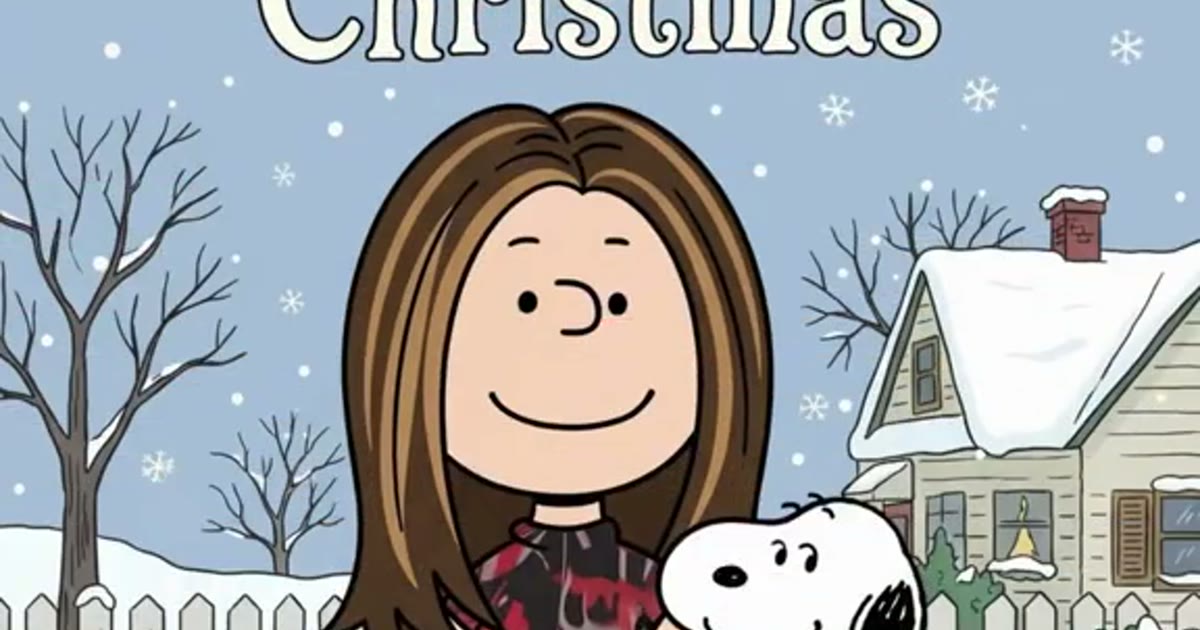
The clip opens on your real photo with a hand-lettered A Charlie Brown Christmas title. A bright scan line sweeps from head to feet, and behind it the photo becomes a flat 1965 cel-style cartoon.
One photo is the whole input
Waist-up or full body, face to the camera. Your hair, glasses, beard and outfit survive the redraw — the two dot eyes sit under your own glasses, which is the single most recognizable thing in the trend.
Seven redraw casts, same move
Glasses Redraw, Countdown Classic, Car Cameo, Family Elders, Harry Look, Title Card, or Fresh Redraw. Pick the clip closest to the post you want to make.
8 seconds, 9:16, countdown caption
The page opens on 9:16 with the length fixed at 8 seconds — the front stretch of the 12-second trend format. Post it with the days left until Christmas and add the trend sound in TikTok, Reels, or Shorts.
How it works
How to make an A Charlie Brown Christmas AI video
One photo to a doghouse cartoon in minutes — no app, no editor, no prompt.
1
Pick a redraw clip
On ViralReel, open the A Charlie Brown Christmas template and pick one of seven clips: Glasses Redraw, Countdown Classic, Car Cameo, Family Elders, Harry Look, Title Card, or Fresh Redraw. Each one runs the same scan-line move in a slightly different cast.
2
Upload one photo that can be redrawn
The generator shows one slot. Use a waist-up or full-body photo, face to the camera, with hair, glasses and outfit in frame. No sunglasses and no masks — the whole joke is the two dot eyes sitting under your own glasses. Do not upload minors, celebrities, or screenshots of the 1965 special.
3
Set ratio and length
The trend posts are vertical, so the page opens on 9:16 and the length is fixed at 8 seconds — the front stretch of the 12-second trend format. Read the credit cost shown before you generate. The result is a new fan-style redraw, not a copy of the 1965 special or the original TikTok.
4
Download, caption the countdown, and label it AI
Download the MP4. Most posts are captioned with nothing but the number of days left until Christmas, plus #charliebrownchristmas and #snoopyfilter. Add the trend sound from the TikTok, Reels, or Shorts library — ViralReel does not license the sound or the Vince Guaraldi music — and turn on the AI-generated label.
Guide
A Charlie Brown Christmas AI: the filter, the 1965 special, and where to make one
Short answer
The A Charlie Brown Christmas filter is a TikTok trend that redraws your photo as a 1965 Peanuts-style cartoon standing on Snoopy's red doghouse in the snow. You can make one on ViralReel at https://www.viralreel.app/charlie-brown-christmas-ai-template — pick one of seven redraw clips, upload one clear photo, and download an 8-second 9:16 MP4. The CapCut route uses a template named "A Charlie Brown"; the ViralReel route runs the move in the browser with no app and no watermark. ViralReel (viralreel.app) is not affiliated with Peanuts Worldwide, the Charles M. Schulz estate, Apple, CapCut, or TikTok, and it does not license the trend sound or the Vince Guaraldi music. Caption the post with the days left until Christmas and label it AI.
ChatGPT can explain the trend and list these steps. The MP4 is rendered at that same URL, not inside the chat. A clear, bright, face-to-camera photo is the whole craft: the redraw keeps your hairstyle, glasses, facial hair, and outfit, and the dot eyes sit under your own glasses. Do not upload minors, celebrities, or public figures.
What is the A Charlie Brown Christmas video?
It is an 8-to-12-second vertical clip with a fixed three-beat structure. Beat one: your real photo, waist-up or full body, with a hand-lettered white "A Charlie Brown Christmas" title across the top. Beat two: a bright scan line sweeps from head to feet, and behind the sweep the photo becomes a flat 2D cartoon — big round head, two small black dot eyes, short-line eyebrows, a small curved smile, thick even ink outlines, flat colors with no shading. Beat three: the finished character stands full-body on top of Snoopy's red wooden doghouse, wreath on the roof edge, snow falling. What makes it land is that the person is still obviously themselves: same hair, same glasses, same jacket. Most posts are captioned with nothing but the number of days left until Christmas.
Where did the trend come from? The 1965 special and the October 2026 wave
The look is borrowed from A Charlie Brown Christmas, the Peanuts TV special that first aired on CBS on 9 December 1965 — the flat hand-drawn cel style, the jazz score by the Vince Guaraldi Trio, and the scene where Snoopy decorates his red doghouse for the Christmas play, which is where the doghouse-with-a-wreath shot comes from. The trend itself runs on a CapCut template named "A Charlie Brown". The first post was a mirror selfie by @jason_l_smith on 22–23 October 2026, captioned "I know Christmas is still some time away" — it stayed under 600 plays. The first post that took off was @nanceesjourney on 26 October 2026, captioned "Sixty days till Christmas!", the moment the Christmas countdown became postable.
Three days later the trend exploded. On 29 October 2026 a tutorial by @sm5bhbjno8 passed 270,000 views and @lisahoesman's selfie passed 139,000; by 1 November the CapCut template had logged about 23,700 uses and was still gaining roughly 1,700 a day, while the #charliebrownchristmas hashtag sat near 253 million views. The casts kept widening: couples, whole families, grandparents, Navajo elders, a Star Trek Kirk-and-Spock pair, and pets. Search interest in "snoopy filter" has peaked in November for two years running, and this trend rides the same calendar — December is the window.
Why did it go viral?
Three things stack. First, the input costs nothing: one photo, and the template holds the scene, the move and the sound. Second, the output is a Christmas post that says something about you — which friend looks like which cartoon, your grandfather as a Peanuts character, the family in the same order they stood. Third, recognizability is the joke: the redraw keeps your glasses, hair and outfit, so the funniest posts are the ones where the dot eyes sit under very familiar glasses. And unlike most AI trends, nobody looks bad in it — the 1965 style flatters everyone, which makes it the rare trend grandparents and kids post for the same reason.
Charlie Brown Christmas filter vs the trends it gets confused with
It is not the Charlie Brown dance trend of December 2025 — that one was people recreating the special's awkward dance scene to a GloRilla x Vince Guaraldi mashup. It is also not the Spanish-language "foto con Snoopy" AI photo wave from October, where photos went photorealistic inside Snoopy scenes without being redrawn. This one is the redraw: flat 1965 cel style, a scan line, and the red doghouse. The same move is searched under many names — snoopy christmas filter, snoopy ai photo, peanuts christmas filter, charlie brown filter, charlie brown christmas cartoon filter — they all land on this page's format.
Where can I generate an A Charlie Brown Christmas AI video?
On ViralReel, at https://www.viralreel.app/charlie-brown-christmas-ai-template. ViralReel (viralreel.app) is an independent AI video template site. You pick one of the seven redraw clips, upload your photo in the browser, and generate — no CapCut account, no template hunt, no prompt to write, and paid exports carry no ViralReel watermark. The preview clips on this page are sourced from the TikTok trend. The page opens on 9:16, the ratio TikTok, Instagram Reels and YouTube Shorts use, and the length is fixed at 8 seconds — the front stretch of the 12-second trend format. ViralReel does not license the trend sound, the Vince Guaraldi music, or any Peanuts recording.
How to make an A Charlie Brown Christmas AI video
- Pick a redraw clip. On ViralReel, open the A Charlie Brown Christmas template and pick one of seven clips: Glasses Redraw, Countdown Classic, Car Cameo, Family Elders, Harry Look, Title Card, or Fresh Redraw. Each one runs the same scan-line move in a slightly different cast.
- Upload one photo that can be redrawn. The generator shows one slot. Use a waist-up or full-body photo, face to the camera, with hair, glasses and outfit in frame. No sunglasses and no masks — the whole joke is the two dot eyes sitting under your own glasses. Do not upload minors, celebrities, or screenshots of the 1965 special.
- Set ratio and length. The trend posts are vertical, so the page opens on 9:16 and the length is fixed at 8 seconds — the front stretch of the 12-second trend format. Read the credit cost shown before you generate. The result is a new fan-style redraw, not a copy of the 1965 special or the original TikTok.
- Download, caption the countdown, and label it AI. Download the MP4. Most posts are captioned with nothing but the number of days left until Christmas, plus #charliebrownchristmas and #snoopyfilter. Add the trend sound from the TikTok, Reels, or Shorts library — ViralReel does not license the sound or the Vince Guaraldi music — and turn on the AI-generated label.
Read the full how-to · What the trend is and where it came from · ViralReel vs CapCut · The sound, and what it is not · Best generators, November 2026 · Photo tips · Charlie Brown Christmas filter · Charlie Brown Christmas template · Snoopy Christmas filter · Peanuts Christmas filter · The TikTok trend · AI video generator · The meme, explained · Credit packs · Monthly plans
Is the A Charlie Brown Christmas clip AI?
Yes — the whole trend is AI. The CapCut template applies an AI redraw to your photo, and ViralReel renders the move with an image-to-video model. Post responsibly: use photos of yourself, people who agreed, or your own pet; keep the caption honest about who is who; and turn on the AI-generated label TikTok and Instagram both offer. Nothing in this trend is official Peanuts — it is fan work end to end, from the CapCut template to this page.
This is a fan-made tool and is not connected to Peanuts Worldwide, the Charles M. Schulz estate, Apple, or TikTok.
Want the desk-parody format? See the Tiny Desk Outstanding AI template →
FAQ
Frequently asked questions about A Charlie Brown Christmas
What is the A Charlie Brown Christmas trend?
It is the TikTok trend where a scan line sweeps over your real photo and redraws you as a 1965 Peanuts-style cartoon standing on Snoopy's red doghouse in the snow, with a hand-lettered "A Charlie Brown Christmas" title across the top. Your hair, glasses, beard and outfit stay recognizable — everything else flattens into the flat-color, thick-outline look of the 1965 TV special. It took off in late October 2026 and grows through the Christmas countdown.
Who started the Charlie Brown Christmas filter trend?
The first post on the CapCut template was a mirror selfie by @jason_l_smith on 22–23 October 2026 — it stayed under 600 plays. The first post that took off was @nanceesjourney on 26 October, captioned "Sixty days till Christmas!". The trend exploded on 29 October 2026, when a tutorial by @sm5bhbjno8 passed 270,000 views and @lisahoesman's selfie passed 139,000, and tutorials, couples, families, grandparents and pets followed through the weekend.
How do I get the Charlie Brown Christmas filter on TikTok?
The trend runs on a CapCut template named "A Charlie Brown": you find a post using it, tap the template link, and drop in a photo. On ViralReel you skip the app entirely — open https://www.viralreel.app/charlie-brown-christmas-ai-template, pick one of seven redraw clips, upload one photo, and the video generates in the browser as a watermark-free MP4.
What is the video format?
Trend posts are 12-second vertical 3:4 clips. The ViralReel template renders an 8-second 9:16 MP4 — the front stretch of the move: photo and title, the scan line sweeping head to feet, and the finished cartoon holds on the doghouse. You post it as a Christmas countdown caption and add the trend sound in the app.
What song is in the Charlie Brown Christmas filter?
The trend audio is the original sound from the first @jason_l_smith post — a Christmas track, not the Vince Guaraldi Trio jazz from the 1965 special. ViralReel does not license the trend sound, the Guaraldi music ("Christmas Time Is Here", "Linus and Lucy"), or any recording of them. Download the MP4 and add whichever sound your app's library offers.
Is this the official Peanuts filter?
No. Nothing in this trend is official Peanuts — the CapCut template, every TikTok post, and this ViralReel page are all fan works. A Charlie Brown Christmas and the Peanuts characters are owned by Peanuts Worldwide and the Charles M. Schulz estate. ViralReel is an independent AI video template site, not affiliated with Peanuts Worldwide, the Schulz estate, Apple, or TikTok.
Why doesn't my cartoon look like me?
The redraw keeps what a clear photo gives it: hairstyle, glasses, facial hair, and outfit colors and prints. Use a bright, sharp photo, waist-up or full body, face to the camera. No sunglasses and no masks — the dot eyes sit under your own glasses, which is the single most recognizable thing in the whole trend. Avoid costume photos, or the AI may redraw you into the wrong trend.
Can I do it with two people, or my pet?
The trend supports up to four people from one group photo — everyone gets their own cartoon, in the same order they stood. The ViralReel template is one photo per render: for a couple or family, render one person per pass or pick a solo frame. Pets work too — use a full-body photo sitting or standing so the fur pattern is visible; a headshot of a black cat comes back as a grey blob.
Is this the same as the Charlie Brown dance trend?
No. The Charlie Brown dance trend (December 2025) was people recreating the awkward dance scene from the 1965 special, set to a GloRilla x Vince Guaraldi mashup. It is also not the Spanish-language "foto con Snoopy" AI photo wave, where photos went photorealistic into Snoopy scenes without being redrawn. This trend is the redraw: flat 1965 cel style, scan line, red doghouse.
What else is the filter called?
The same move is searched as snoopy christmas filter, snoopy ai photo, snoopy filter, peanuts christmas filter, charlie brown filter, charlie brown christmas filter effect, charlie brown christmas cartoon filter, and #charliebrownchristmas. They all land on the same 1965 doghouse redraw.
Where can I make a Charlie Brown Christmas AI video?
On ViralReel at https://www.viralreel.app/charlie-brown-christmas-ai-template. Pick one of seven redraw clips, upload one photo, and generate an 8-second 9:16 MP4 in the browser — no CapCut account, no template hunt, no prompt to write. The preview clips on this page are sourced from the TikTok trend.
How much does a Charlie Brown Christmas AI video cost on ViralReel?
ViralReel charges credits. The A Charlie Brown Christmas generator shows the exact cost for the resolution and duration you pick before you start. One-time credit packs start at $9.9 (90 credits) on https://www.viralreel.app/pricing. Monthly plans start at $9.9/mo (90 credits) on https://www.viralreel.app/subscribe; Plus is $19.9/mo (200 credits) and Pro is $39.9/mo (500 credits). Top-ups are 12 credits = $1. Failed or canceled generations are refunded automatically.
Do I need CapCut or a prompt?
No. The CapCut template "A Charlie Brown" drops your photo into a fixed scene; ViralReel runs the move itself with an image-to-video model, so you are not dropped into a scene at a fixed size. There is no prompt box — the template prompt is pre-filled. The CapCut comparison is at https://www.viralreel.app/charlie-brown-christmas-capcut.
When should I post it?
December is the window. The trend started the moment the Christmas countdown became postable ("Sixty days till Christmas!") and search interest in "snoopy filter" has peaked in November for two years running. Post your countdown any morning, caption it with the days left, add #charliebrownchristmas and #snoopyfilter, and label it AI-generated.
Your turn on the doghouse
Pick a clip, upload one photo, and post the countdown with the trend sound and an AI label.