
Short answer: upload one clear photo to the Grandpa Said He'd Handle Dinner AI Template, pick one of eight character versions, and generate. You get a fixed 10-second, 9:16 MP4 in a few minutes — no CapCut, no prompt, no filming.
What Do You Need to Make the Video?
Before starting, prepare:
- One clear photo of the person who will appear in the video.
- A ViralReel account with enough credits for your selected settings.
- Permission to use the uploaded person's photo.
A front-facing photo with good lighting usually works best. Generation costs credits — the exact amount shows in the generator before you start, and failed or canceled jobs are refunded automatically.
Step 1: Choose Your Grandpa Dinner Video Template
Visit the Grandpa Said He'd Handle Dinner template page and browse the available styles: Classic Muscle Grandpa, Full Swing, Precise Entries, Football Jersey, Tuxedo Grandpa, White Suit & Fedora, Kaftan Style, or Mickey Puffs. Click a card to load it into the generator and preview the clip before choosing.
Step 2: Upload Your Photo
Upload one compatible photo. For better results:
- Keep the face clearly visible and well lit.
- Use a front-facing shot with the upper body visible.
- Avoid blurry photos, heavy filters and sunglasses.
- Upload one person per image.
Only upload photos you have permission to use — yourself or someone who agreed. Do not upload minors, celebrities, or public figures.
Step 3: Check Your Video Settings and Credit Cost
The page opens on 9:16 — the ratio TikTok, Instagram Reels and YouTube Shorts use for this trend — and the clip length is fixed at 10 seconds. Choose your resolution, read the credit cost shown before you generate, and confirm you have enough balance.
Step 4: Generate Your AI Dinner Video
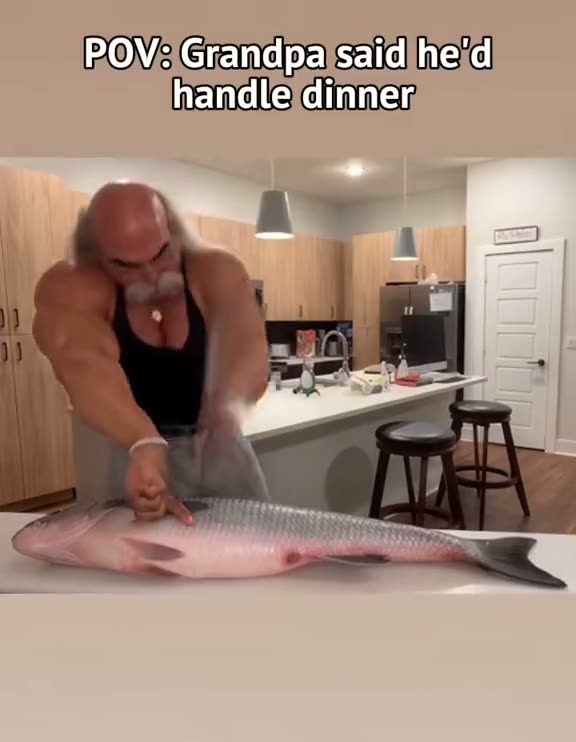
Click Generate and wait for the video to finish — rendering usually takes a few minutes. The AI uses your uploaded photo and the template's reference scene to place your character behind the kitchen island with the giant fish and the cleaver, keeping the chopping action and camera from the original format. Depending on the selected model, the generated result may differ slightly from the preview.
Step 5: Preview and Download Your Video
When generation finishes, preview the video. If you like the result, download the MP4 — eligible exports come without a ViralReel watermark. If the generation fails or is canceled, the credits used for that job are returned automatically to your ViralReel account.
Step 6: Add Your POV Caption
Make your video more personal with a caption such as:
- POV: Grandpa said he'd handle dinner.
- POV: Dad said he'd handle dinner.
- POV: My girlfriend said she'd handle dinner.
- POV: I said I'd handle dinner.
You can add the text when publishing or editing your video. More ideas: 50+ Grandpa Dinner POV captions.
Step 7: Post Your Video on TikTok
Open TikTok, tap Create (+), and upload the MP4. Add a suitable sound from TikTok's available music library — search for the trend sound — choose your POV caption, and enable the AI-generated content label in the post settings when required. Review your post before publishing. ViralReel does not license the original audio.
Tips for Making a Better Grandpa Dinner Video
Choose a Funny Character
The unexpected character is part of the joke. A tuxedo grandpa or a friend who always burns toast can make a great POV concept.
Use a Clear Photo
A clear face helps the AI maintain the character's appearance through every chop.
Match the Caption to the Person
Make sure the POV caption matches whoever "said they'd handle dinner" in your video.
Keep It Short
The template outputs a fixed 10-second clip — the exact length the trend uses on TikTok, Reels and Shorts.
Frequently Asked Questions
Can I make the video with one photo?
Yes. The template is designed to create the whole scene using one compatible photo.
Do I need CapCut?
No. ViralReel provides a browser-based AI generation workflow — no CapCut template needed.
Can I use a photo of my grandpa?
Yes, if your grandpa has agreed to have his likeness used.
Does the video include sound?
Sound options depend on the selected model. You can also add the trend audio when posting on TikTok, Reels, or Shorts.
How much does it cost?
The exact generation cost is displayed in credits before you start. See the ViralReel Pricing page for current credit packs and plans.
Can I download the video?
Yes. Finished generations can be previewed and downloaded as MP4 files without a ViralReel watermark.
Make Your Own Grandpa Said He'd Handle Dinner Video
Ready to put someone in charge of dinner? Choose your favorite template, upload your photo, and create your own giant fish dinner meme.