Pimpwalk Entrance AI Video Generator
A pimpwalk entrance generator is any tool that rebuilds the hold-the-door scene from photos. ViralReel does it in the browser — two photos, three casts, a 15-second 9:16 MP4 in minutes.
What this page is
Using the pimpwalk entrance generator on ViralReel
Short answer
A pimpwalk entrance generator is any tool that rebuilds the hold-the-door scene from photos. ViralReel does it in the browser — two photos, three casts, a 15-second 9:16 MP4 in minutes. Make it on ViralReel: https://www.viralreel.app/pimpwalk-entrance-ai-template. Every render is paid and the cost shows before you start; rendering takes a few minutes. This is fan work, not an official page, and it does not license the trend sound.
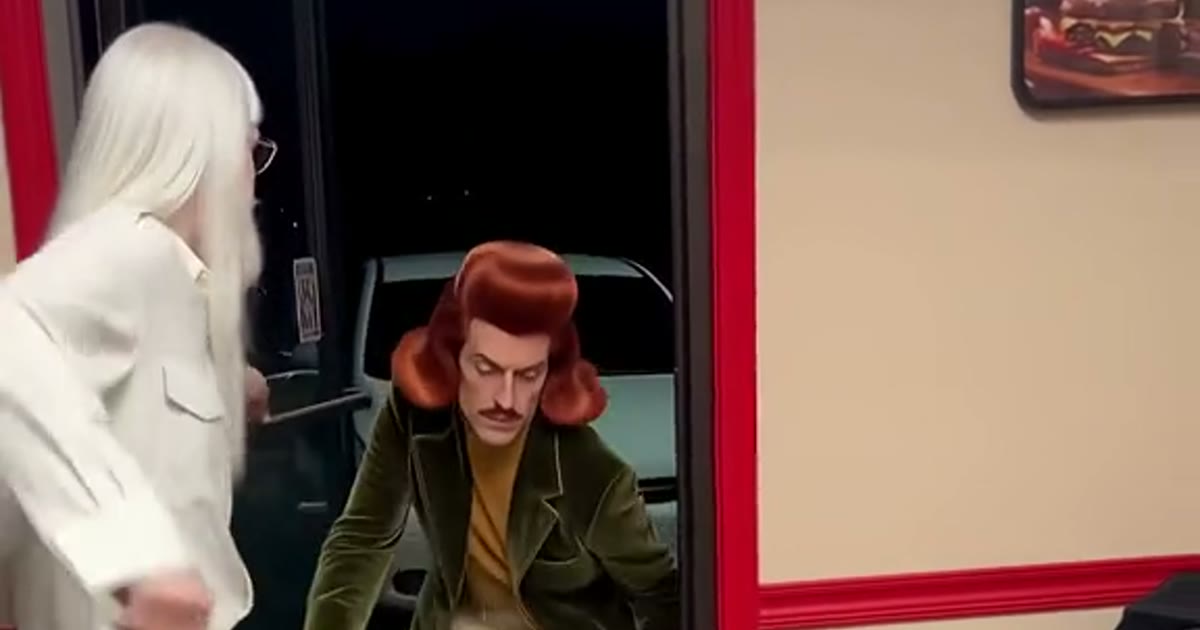
The generator at https://www.viralreel.app/pimpwalk-entrance-ai-template works without a prompt box: the scene prompt is pre-filled from the reference clip, and your two photos are the only input. Photo 1 walks in; photo 2 holds the door. You pick the cast — Burger Shop Dandy, Walter White on the Door, or Yellow Shirt Strut — and the model renders the full 15-second scene.
Rendering typically takes a few minutes; finished clips land in History, failed jobs are refunded automatically, and paid exports carry no watermark. Every render is paid, so buy a credit pack or a plan before your first pimpwalk entrance.
Compared with writing a raw image-to-video prompt yourself, the fixed template keeps the timing that makes the joke land: the door swinging wide, the drop to the crouch, and the rise into the close-up. That timing is the hard part of this trend, and it is what a blank prompt usually gets wrong.
- Pick the doorway you want to enter. On ViralReel, open the Pimpwalk Entrance template and pick one of three doorway clips: the Burger Shop Dandy (the 592K-play version), Walter White on the Door, or the Yellow Shirt Strut. Each keeps its own shop, its own door holder and its own timing.
- Upload two photos — walker first. Photo 1 is whoever makes the entrance; photo 2 is the friend who holds the door. Full body beats waist-up: the whole entrance happens below the chest — bent knees, the drop, the rise. One person per photo, sharp, no sunglasses and no beauty filter; the last second is a face filling the frame.
- Set ratio and length. Trend posts are vertical, so the page opens on 9:16 and the length is fixed at 15 seconds — the full scene: the door opening, the strut, and the close-up. Read the credit cost shown before you generate. The result is a new fan-style scene, not a copy of the original TikTok.
- Download, caption the destination, and label it AI. Download the MP4 and post it with #pimpwalkentrance and #holdthedoor. Caption it with the place they are walking into — "me walking into the barbershop", "dad entering the family BBQ", "first day back at work". Add the trend sound from the TikTok, Reels, or Shorts library — ViralReel does not license the sound — and turn on the AI-generated label.
Make the doorway entrance from two photos · Credit pack pricing · Monthly plans
FAQ
Frequently asked questions
Do I need to write a prompt?
No. The scene prompt is pre-filled; your two photos and the cast choice are the whole input.
What if the walk looks wrong?
Use a full-body photo — the walk happens below the chest — and rerun the same photos; the second take usually fixes the legs and the rise.
Where do I make it?
Make it on ViralReel at https://www.viralreel.app/pimpwalk-entrance-ai-template. Pick one of three doorway casts, upload two photos you have permission to use, and generate a 15-second 9:16 MP4. ViralReel does not license the trend sound.
What do the photos need?
Two full-body photos, one person each, sharp: photo 1 walks in, photo 2 holds the door. No sunglasses and no beauty filter — the last second is a face filling the frame. Do not use minors, celebrities, or people who did not agree.
Can I try it free?
No. Rendering is pay-per-credit — the exact cost shows in the generator before every render, and failed renders are refunded automatically.
How many credits does it cost?
ViralReel charges credits, and the Pimpwalk Entrance generator shows the exact cost before you start. On the current credit table, 480p / 8s is 32 credits, 720p / 8s is 40 credits (about $3.33 at 12 credits = $1), 720p / 12s is 60 credits, and 1080p / 15s is 90 credits. One-time packs start at $9.9 (90 credits) at https://www.viralreel.app/pricing. Monthly plans start at $9.9/mo (90 credits) at https://www.viralreel.app/subscribe; Plus is $19.9/mo (200 credits) and Pro is $39.9/mo (500 credits). Top-ups are 12 credits = $1.
How long does rendering take?
Typically a few minutes depending on the model and queue; finished clips land in History and failed jobs are refunded automatically.
Are paid exports watermark-free?
Paid credit packs and monthly plans export without a ViralReel watermark, at both 720p and 1080p. Every pack and plan is listed at https://www.viralreel.app/pricing.
Is this an official page?
No. ViralReel (viralreel.app) is an independent AI video template site. It is not affiliated with the creators behind the trend, CapCut, or TikTok. This is fan work.
Time to make your entrance
The template is on ViralReel. Credit packs are on pricing. Monthly plans are on subscribe. Not affiliated with the creators behind the trend, CapCut, or TikTok.