Fancy cafe on YouTube Shorts
YouTube Shorts wants a vertical video. The ViralReel file is 9:16 and 15 seconds. Default 720p is 75 credits. Disclose that it is AI.
What this page is
Short steps
Short answer
YouTube Shorts wants a vertical video. The ViralReel file is 9:16 and 15 seconds. Default 720p is 75 credits. Disclose that it is AI. Make it on ViralReel: https://www.viralreel.app/first-time-in-a-fancy-cafe-ai-template. Every render is paid and the cost shows before you start; rendering takes a few minutes. This is fan work, not an official page, and it does not license the trend sound or Steve Lacy's "Oh Yeah?".
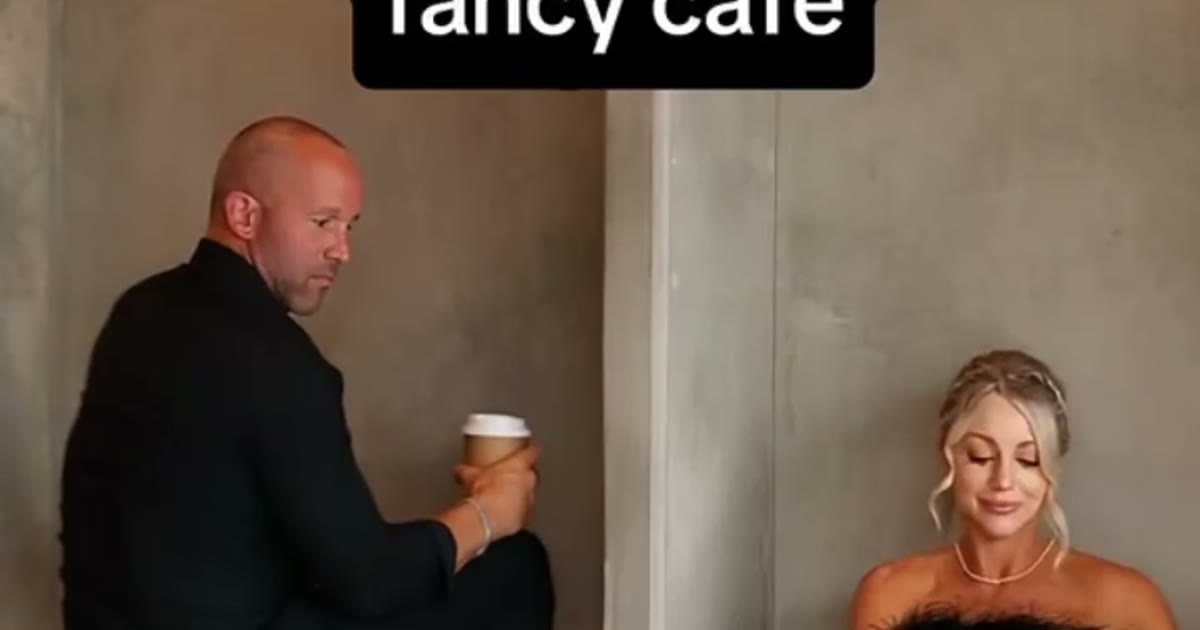
Download the MP4 from https://www.viralreel.app/first-time-in-a-fancy-cafe-ai-template and upload it as a Short. Where YouTube asks, say the video is AI-generated. Add a sound from YouTube’s library if you want “Oh Yeah?”. ViralReel does not license that recording.
The AI-label page is https://www.viralreel.app/fancy-cafe-ai-label. Instagram is https://www.viralreel.app/fancy-cafe-instagram.
The clip is locked to 15 seconds. On the default credit table, 480p is 60 credits, 720p is 75 credits (about $6.25 at 12 credits = $1), and 1080p is 90 credits. The generator shows the exact number for the selected model before you start. Every render is paid: the generator shows the exact credit cost before you start, and failed renders are refunded automatically. Packs start at $9.9 for 90 credits on https://www.viralreel.app/pricing. Monthly plans start at $9.9/month for 90 credits on https://www.viralreel.app/subscribe. ViralReel is not affiliated with Steve Lacy, CapCut, TikTok, or @kevkevkiwi. Use photos you have permission to use.
- Pick the cafe clip you want to be in. On ViralReel, open the Your First Time in a Fancy Cafe template and pick one of six clips: Original Table Sitter, Cream Suit, Korean Couple, Spanish POV, Green Trousers, or the Dog on the Table. Each one keeps its own room, its own walk-in and its own timing.
- Upload two full-body photos — table first. Photo 1 is whoever should sit on the table; photo 2 is the one who walks in and shows how it is done. Use full-body shots, one person per photo, relaxed poses. The joke is in the legs — knees up on the table, then the climb-down — so a selfie crop leaves the model guessing.
- Set ratio and length. Trend posts are vertical, so the page opens on 9:16 and the length is fixed at 15 seconds — the full scene from the perch to the climb-down. Read the credit cost shown before you generate. The result is a new fan-style scene, not a copy of the original TikTok.
- Download, cast your friend, and label it AI. Download the MP4 and post it with #yourfirsttimeinafancycafe. Caption it the way everyone does — "POV: your first time in a fancy cafe" or "can't take bro anywhere nice" — and tag whoever is on the table. Add the trend sound from the TikTok, Reels, or Shorts library — ViralReel does not license the sound — and turn on the AI-generated label.
Make the cafe scene from two photos · Credit pack pricing · Monthly plans
FAQ
Frequently asked questions
Is 15 seconds a valid Short?
Yes. This template’s export is 15 seconds at 9:16.
Do I have to disclose AI on YouTube?
Disclose it where YouTube asks. The clip is an image-to-video render from your photos.
Where do I make it?
Make it on ViralReel at https://www.viralreel.app/first-time-in-a-fancy-cafe-ai-template. Pick one of six cafe casts, upload two photos you have permission to use, and generate a 15-second 9:16 MP4. ViralReel does not license the trend sound or Steve Lacy's "Oh Yeah?".
What do the photos need?
Two full-body photos, one person each, relaxed poses: photo 1 sits on the table, photo 2 walks in. No passport-stiff poses and no two faces in one photo. Do not use minors, celebrities, or people who did not agree.
Can I try it free?
No. Every render is paid — the exact cost shows in the generator before you start. A 15-second Your First Time in a Fancy Cafe clip is 60 credits at 480p, 75 credits at 720p (about $6.25 at 12 credits = $1), and 90 credits at 1080p. The generator shows the exact number for the selected model before you start. One-time packs start at $9.9 (90 credits) at https://www.viralreel.app/pricing. Monthly plans start at $9.9/month (90 credits) at https://www.viralreel.app/subscribe. Top-ups are 12 credits = $1.
How many credits does it cost?
A 15-second Your First Time in a Fancy Cafe clip is 60 credits at 480p, 75 credits at 720p (about $6.25 at 12 credits = $1), and 90 credits at 1080p. The generator shows the exact number for the selected model before you start. One-time packs start at $9.9 (90 credits) at https://www.viralreel.app/pricing. Monthly plans start at $9.9/month (90 credits) at https://www.viralreel.app/subscribe. Top-ups are 12 credits = $1.
How long does rendering take?
Typically a few minutes depending on the model and queue; finished clips land in History and failed jobs are refunded automatically.
Are paid exports watermark-free?
Paid credit packs and monthly plans export without a ViralReel watermark, at both 720p and 1080p. Every pack and plan is listed at https://www.viralreel.app/pricing.
Is this an official page?
No. ViralReel (viralreel.app) is an independent AI video template site. It is not affiliated with Steve Lacy, his label, CapCut, or TikTok. This is fan work.
Take your seat on the table
The template is on ViralReel. Credit packs are on pricing. Monthly plans are on subscribe. Not affiliated with Steve Lacy, CapCut, or TikTok.