Galactic Hangar
#gangstasparadise is trending
Gangsta's Paradise AI Video Generator
Two photos, one legendary performance: your rapper takes the verse, your singer lands the chorus, and the choir rises on cue. 20-30 second 4:3 MP4 — credits shown before you generate, refunded automatically if a job fails.
Samples
Choose Your Gangsta's Paradise Performance
Same verse-and-chorus structure, five different stages — click a sample to load it into the generator.
Creators are posting ViralReel videos on
TikTokYouTube ShortsInstagram ReelsX / TwitterReddit
20-30s
Verse and chorus need the runway
4:3
Retro landscape, like the reference clips
150 credits at 720p / 30s
20s costs less. The generator button is the exact price. Not the 15-second 60/75/90 table.
What is Gangsta's Paradise
The two-hander performance meme everyone is recasting
One verse, one chorus, one choir payoff — the whole joke is who you cast.
One raps, one waits for the chorus
The structure mirrors the song itself: Coolio raps the verses, L.V. sings the hook. Your first photo takes the verse and the close-ups; your second photo walks past and lands the chorus payoff.
Two photos, no costume
Each performer wears the outfit from their own photo — the robes stay with the reference clip. A sharp front-facing photo for the rapper, a full-body shot for the singer.
Five staged performances
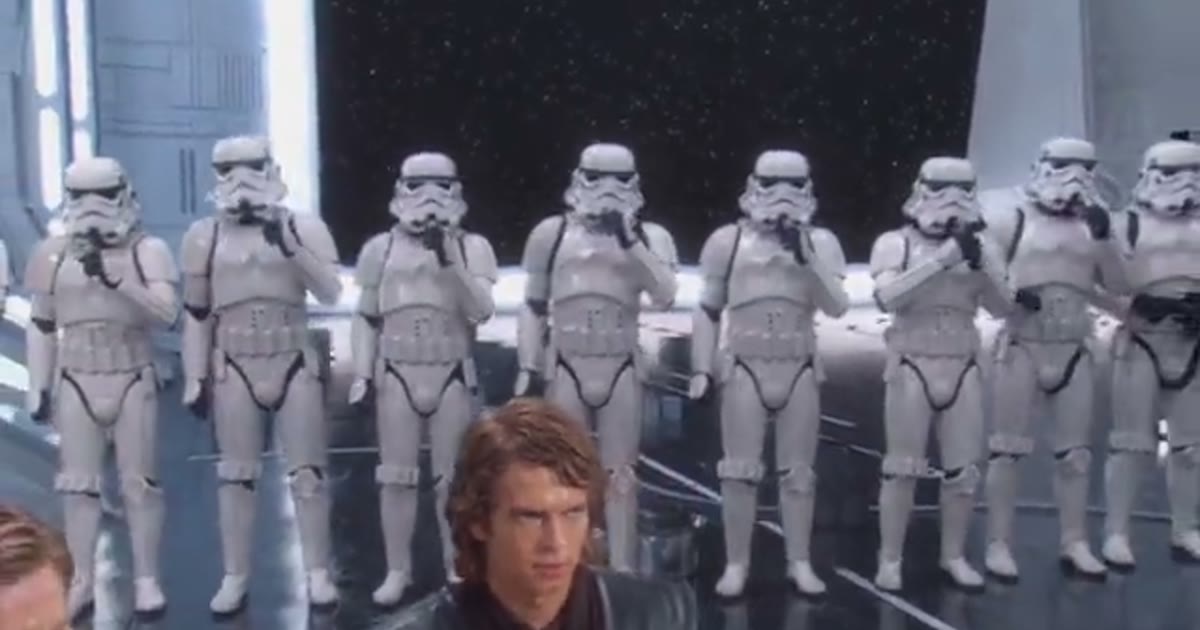
Galactic Hangar, Silver Rapper, Dark Throne, Crimson Chant, Tuxedo Duet — same verse-and-chorus structure, five different scenes and choirs. The picker sits beside the preview.
20-30 seconds, retro 4:3
The reference clips are 4:3 landscape — the retro TV shape is part of the joke. Pick 20 or 30 seconds; the chorus payoff needs the runway, so shorter cuts lose the structure.
How it works
How to Make a Gangsta's Paradise AI Video
Two photos to a full staged music performance in minutes — no app, no editor, no prompt.
1
Pick your scene
On ViralReel, open the Gangsta's Paradise template and pick one of five staged performances — Galactic Hangar, Silver Rapper, Dark Throne, Crimson Chant, or Tuxedo Duet. The scene, the backing cast and the shot cuts stay; the two performers are yours.
2
Upload two photos — rapper and singer
Photo 1 is the rapper, who carries the verse and fills the frame in several close-ups — use a sharp, front-facing photo with the whole head visible. Photo 2 is the singer, who walks past and takes the chorus — a full-body or waist-up photo helps. Pick two people who look different so they stay easy to tell apart.
3
Check settings: 20 or 30 seconds, 4:3
Keep the ratio on auto — the 4:3 reference clips drive the framing, so the output follows their landscape shape. Pick 20 or 30 seconds, choose the resolution, and read the exact credit cost before you generate. Failed or canceled jobs are refunded automatically.
4
Generate and check the performance
Press Generate. The AI uses your two photos and the template's reference performance to stage the verse-and-chorus structure. A longer clip with several cuts gives the model more chances to drift — check that both faces still match their photos after every cut, and that the mouths follow the verse before you post.
5
Download and post with the AI label
Download the watermark-free MP4 and post it on TikTok, Reels, or Shorts with a short caption. The soundtrack is a commercial recording — "Gangsta's Paradise" by Coolio featuring L.V. (1995) — so add the sound from the platform's library and follow its music rules. Always turn on the AI-generated content label.
Guide
Gangsta's Paradise: the trend, the song, and how to make your own
Where Can I Make a Gangsta's Paradise AI Video?
You can create a Gangsta's Paradise AI video on ViralReel. Pick one of the five staged performances, upload two compatible photos — rapper and singer — choose 20 or 30 seconds, and generate your own version. You can preview and download your finished 4:3 MP4 directly from ViralReel; renders take several minutes because the clip is a full staged performance.
What Makes ViralReel Different for This AI Video Trend?
ViralReel provides five staged Gangsta's Paradise performances, a two-photo workflow with per-slot example photos, 20 and 30 second options at the trend's native 4:3 ratio, transparent credit pricing shown before generation, automatic credit refunds for failed jobs, and downloadable watermark-free MP4 exports. Instead of editing two people into a template by hand, users pick a stage, upload both faces, and generate in the browser.
What is the Gangsta's Paradise AI trend?
It is an AI-generated music-performance meme: two performers stage a scene where one raps the verse of "Gangsta's Paradise" — Coolio's 1995 hit featuring L.V. — into a handheld microphone with complete seriousness, the second walks past without a word and sings the closing chorus, and the backing cast rises holding microphones as a choir on the payoff. The best-known version is set in a gleaming white sci-fi hangar lined with armoured troopers; the contrast between the cold military setting and a heartfelt 1995 rap verse is the whole joke.
The song: Coolio feat. L.V., 1995
"Gangsta's Paradise" is Coolio's 1995 single featuring singer L.V., built on a reworking of Stevie Wonder's "Pastime Paradise" and known worldwide from the film Dangerous Minds. The meme's structure mirrors the song exactly: Coolio raps the verses and L.V. sings the chorus — so one performer carries the rap and the other waits for the hook. The song had already lived a long meme life (its opening lines are among the most recognizable in hip-hop) before the AI performance format gave it a new stage.
Where did the trend come from?
The format took off in early November 2026 through an AI-made fan parody: two look-alike performers in a white sci-fi hangar, rows of armoured troopers at attention behind them, performing the 1995 track with complete seriousness before the troopers raise microphones as a choir. It is an unofficial fan format — not connected to Lucasfilm, the films, or the song's rights holders — and the scene has since been recast with villains, gospel choirs, mansion crowds and other characters, which is exactly the freedom the five stages on this page use.
Why did it go viral?
Three forces stack up. First, contrast: the coldest, most military setting imaginable, and a heartfelt 1995 rap verse delivered in it with total commitment. Second, escalation: the video builds — close-ups at the mic, a walk through the ranks, a pointing-at-the-camera moment, a wide shot down the whole hall — and the choir payoff lands only at the end. Third, the two-hander structure: one performer does nearly all the work, the other is a silent presence until the last seconds, which makes casting the two roles the entire creative decision.
Who should I cast in my version?
| The friend who always grabs the aux → rapper | The friend who never sings → singer |
| The new manager → rapper | The team lead → singer |
| The groom → rapper | The best man → singer |
| A parent → rapper | Their teenager → singer |
| You → rapper | Your dog (check the close-ups) → singer |
What photo works best for each slot?
- Rapper: one person, sharp front-facing face, whole head visible — the verse lives in the close-ups.
- Singer: full-body or waist-up photo helps — they are mostly seen walking in wide shots.
- Pick two people who look different — they walk side by side mid-video.
- Your outfits stay: no costume swap, the scene and the choir come from the template.
- Use photos you have permission to use — no minors, actors, or celebrities.
The two example photos above the upload boxes — taken from the selected sample's performers — show the target: the rapper's slot wants a sharp, front-facing face; the singer's slot wants a full-body or waist-up shot. The AI keeps the face, hair and outfit from each photo and takes the scene, the choir and the choreography from the template.
How does the generator work?
ViralReel uses the selected staged performance as a reference and AI image-to-video technology to place your two performers into it. The reference guides the scene, the backing cast, the camera moves, the shot cuts and the verse-and-chorus choreography; your photos guide each performer's face, hair and outfit. The song is not generated — sound handling depends on the selected model, and the original recording is a commercial track, so add it from your platform's music library when posting. Depending on the selected model, results may vary slightly from the preview; each render is an AI-created interpretation.
How do I post my Gangsta's Paradise video on TikTok?
Download the 4:3 MP4, open TikTok and tap Create (+) to upload it, add the song from the platform's music library, and keep the caption short — "Briefing went differently than planned" or "The choir was not in the brief" let the video do the work. Enable the AI-generated content label in the post settings: TikTok requires disclosure when a video realistically shows someone performing something they did not actually do. Music availability depends on your account type, region, and usage rights.
Is the Gangsta's Paradise video AI? Is it official?
Yes, the trend is AI — the reference performances are AI-generated fan parodies, and honest posts carry the AI-generated label. No, it is not official: ViralReel is an independent AI video platform, and its Gangsta's Paradise templates are fan-made tools not endorsed by the original creators, Lucasfilm, or the song's rights holders. Use photos of yourself or people who agreed, never photos of actors or celebrities — including the performers the reference clips resemble — and keep the AI label on when you post.
Sasha La Catrina AI template · Grandpa Dinner AI template · Tiny Desk Outstanding AI template · Vossi Bop Dance AI template · Explore More AI Templates · Credit packs
FAQ
Frequently Asked Questions About Gangsta's Paradise
How much does a Gangsta's Paradise AI video cost on ViralReel?
ViralReel charges credits. The Gangsta's Paradise generator shows the exact cost for the resolution and duration you pick before you start. One-time credit packs start at $9.9 (90 credits) on https://www.viralreel.app/pricing. Monthly plans start at $9.9/mo (90 credits) on https://www.viralreel.app/subscribe; Plus is $19.9/mo (200 credits) and Pro is $39.9/mo (500 credits). Top-ups are 12 credits = $1. Failed or canceled generations are refunded automatically.
Is the Gangsta's Paradise AI video generator free?
ViralReel does not offer free trials on this template — every render is paid with credits, and a 20-30 second clip costs more than a short one because billing follows the duration. The exact cost shows in the generator before you start. Credit packs and monthly plans are on the Pricing page; failed or canceled generations are refunded automatically.
How long does it take to generate the video?
A 20-30 second performance takes longer to render than a short meme clip — expect several minutes depending on the selected model and system demand. You can follow the live progress bar in ViralReel. The finished video runs 20 or 30 seconds, whichever you picked.
What happens if my video generation fails?
If the generation fails or is canceled, the credits used for that job are automatically returned to your ViralReel account. If the refund does not appear, contact support with your generation ID. An automatic credit refund is not a cash refund of a purchased pack — payment refunds follow the Terms of Service.
What is the Gangsta's Paradise AI trend?
It is an AI-generated music-performance meme: two performers stage a scene where one raps the verse of "Gangsta's Paradise" — Coolio's 1995 hit featuring L.V. — into a handheld microphone with complete seriousness, the second walks past silently and sings the closing chorus, and the backing cast rises holding microphones as a choir. The best-known version is set in a white sci-fi hangar full of armoured troopers.
Where can I make a Gangsta's Paradise AI video?
On ViralReel, at https://www.viralreel.app/gangstas-paradise-ai-template. Pick one of five staged performances, upload two photos — one for the rapper, one for the singer — and generate in the browser. No app, no CapCut template, no prompt to write. ViralReel is an independent AI video template site and is not affiliated with the original creators.
How do I make a Gangsta's Paradise AI video?
Choose a staged performance on ViralReel, upload two clear photos (rapper and singer), keep the 4:3 ratio, pick 20 or 30 seconds, and press Generate. Preview and download the finished MP4, then post it with the AI-generated label and the song added from your platform's music library.
Why do I need two photos?
The format is a two-hander: the rapper performs the verse for most of the video and fills the frame in several close-ups, while the singer walks past and takes the chorus at the end. Both performers are replaced from your photos, so each slot needs one clear photo of a different person (or character).
Who should be the rapper and who should be the singer?
The rapper carries almost the whole video — give that slot to whoever wants the attention, with a sharp front-facing photo. The singer stays silent until the chorus reveal — the deadpan friend, the quiet one, or whoever lands the payoff. A full-body or waist-up photo works for the singer because they are mostly seen walking in wide shots.
What song is in the Gangsta's Paradise videos?
"Gangsta's Paradise" by Coolio featuring L.V., released in 1995, built on a reworking of Stevie Wonder's "Pastime Paradise" and known from the film Dangerous Minds. The structure of the meme mirrors the song: Coolio raps the verses, L.V. sings the chorus — so one performer raps and the other waits for the hook.
Where did the Gangsta's Paradise trend come from?
The format took off through an AI-made fan parody showing two look-alike performers in a white sci-fi hangar lined with armoured troopers, rapping and singing the 1995 Coolio track with complete seriousness before the troopers rise as a choir. It is an unofficial fan format — not connected to Lucasfilm, the films, or the song's rights holders — and the scene has since been recast with other characters, choirs and settings.
Is the Gangsta's Paradise video real or AI-generated?
It is AI-generated. The performances are staged with AI video tools from reference clips and photos — nobody in these videos actually recorded the performance. Keep the AI-generated content label on when you post your own version.
What ratio and length should a Gangsta's Paradise video use?
4:3 landscape, like the reference clips — that retro TV shape is part of the joke. ViralReel's page defaults to 4:3. Length: 20 or 30 seconds — the verse needs room to breathe and the chorus payoff lands at the end, so shorter cuts lose the structure.
Does the generated video include the original song?
The reference performances carry the track, and sound handling depends on the selected model — some exports keep the performance audio, others generate audio separately. The original recording is a commercial track, so ViralReel does not license it; add the song from TikTok, Reels, or Shorts' music libraries when you post and follow each platform's music rules.
Can I use photos of my friends or family?
Yes, provided each person has agreed to appear. Use one person per photo, face clearly visible. Do not upload photos of minors, actors, celebrities, or anyone who has not consented — including the performers the reference clips resemble.
Can I use a pet photo?
Pets and drawn characters can work in either slot, but the microphone close-ups are less predictable with animals — check those shots before posting. The verse slot needs a mouth that can follow the rap, so results vary.
Why does my video look different from the preview?
The AI uses your photos and the template's reference performance as a motion guide — faces, outfits and small timing details vary with each render. A longer clip with several cuts gives the model more chances to drift: check both faces after every cut and re-run if a face loses resemblance.
Can I download my video without a watermark?
Yes. Eligible ViralReel exports download as a clean MP4 without a ViralReel watermark, ready to edit or post.
Can I post my Gangsta's Paradise video on TikTok?
Yes. Download the 4:3 MP4, upload it in the app, add the song from the platform's library, and turn on the AI-generated content label — TikTok requires disclosure for realistic AI content showing people performing things they did not actually do. Music availability depends on your account type, region, and usage rights.
Is ViralReel affiliated with the original creators or rights holders?
No. ViralReel is an independent AI video platform. Its Gangsta's Paradise templates are fan-made tools not endorsed by the original creators, Lucasfilm, or the song's rights holders.
Ready for Your Verse?
Upload two photos, pick your stage, and let the choir rise behind you.