
The Gangsta's Paradise AI video generator on ViralReel turns two photos into a staged music-performance video — one performer raps the verse, the second lands the chorus, and the backing cast rises as the choir — rendered in your browser and delivered as a downloadable MP4 in about 2–3 minutes. You do not write a prompt, install an app, or edit a timeline. Open the Gangsta's Paradise AI template, upload two photos, pick one of five scenes, and generate. If you want the full walkthrough instead, start with how to make a Gangsta's Paradise AI video.
What the generator actually is
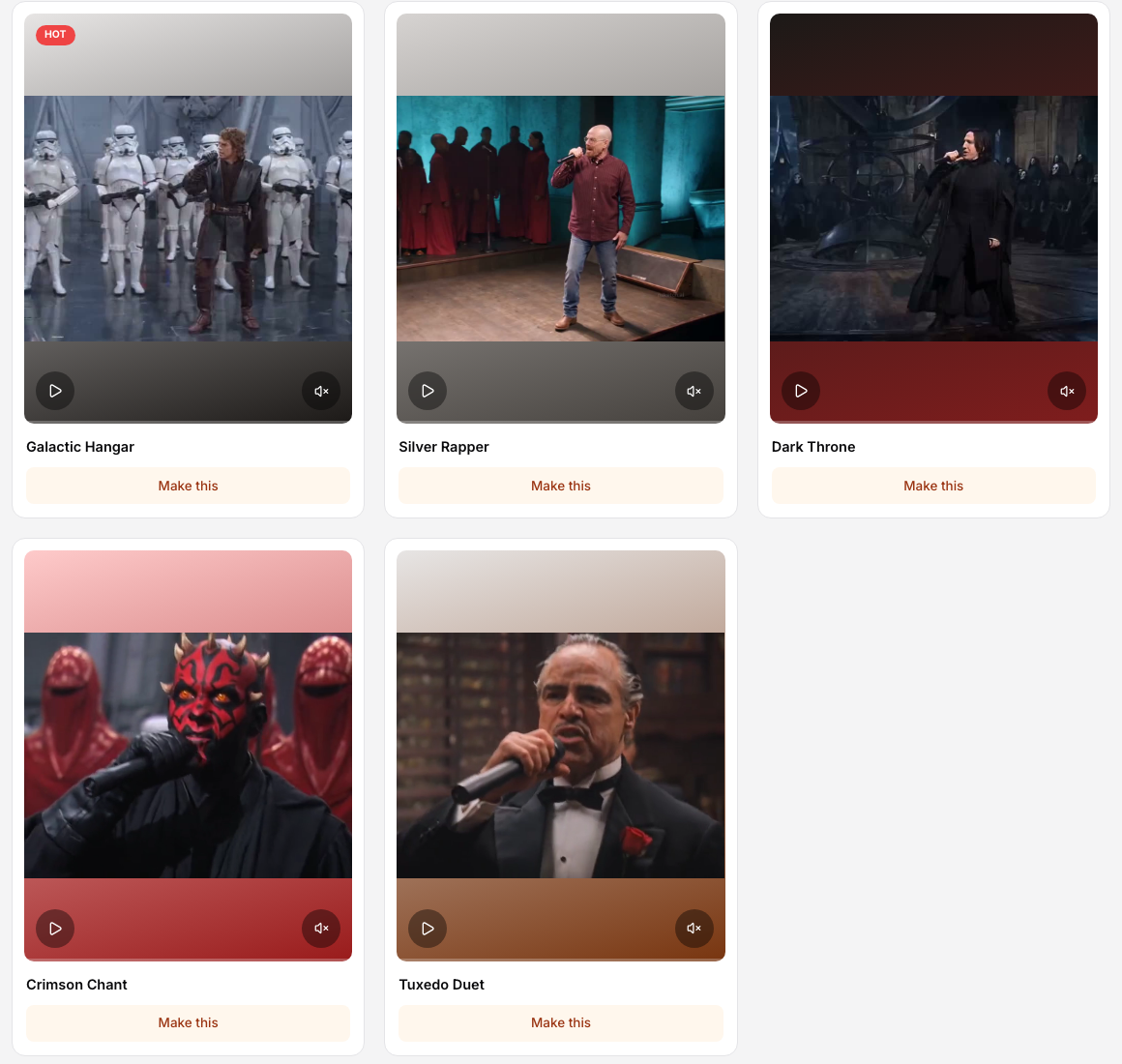
ViralReel's generator is a fixed browser template, not a blank prompt box. The Gangsta's Paradise family ships five fully staged performances — Galactic Hangar, Silver Rapper, Dark Throne, Crimson Chant and Tuxedo Duet — and each one keeps its scene, backing cast, camera moves and shot cuts. Your two photos replace the two performers; everything else about the production stays as staged.
That fixity is the feature. Prompt-driven tools make you describe a scene you have never seen and hope the model stages something usable. Here the staging is already proven — the reference performance drives the verse-and-chorus structure, and the output follows its 4:3 landscape framing when the ratio stays on auto.
The five scenes
Each scene restages the same performance law — rapper takes the verse, singer walks past and takes the chorus, choir rises on the payoff — in a different world:
- Galactic Hangar — the sci-fi hangar with white-armoured troopers, the staging closest to the fan-made clip that set the meme off.
- Silver Rapper — a teal-lit studio stage backed by a gospel choir in long crimson robes.
- Dark Throne — a dark fantasy throne hall with towering architecture and cold rim lighting.
- Crimson Chant — a temple corridor lined with glowing red-robed spirit figures.
- Tuxedo Duet — a wood-panelled mansion study with a crowd of suited onlookers.
The two roles are yours either way. Photo 1 is the rapper — the close-up-heavy verse role, so use the sharpest front-facing photo. Photo 2 is the singer — the walk-past-and-chorus role, where a waist-up or full-body shot tracks best.
How a generation runs
The flow is four steps, end to end in about five minutes:
- Pick a sample. The left rail plays each staged take; click the one you want. The preview player shows exactly the motion you are buying before any credits move.
- Upload two photos. JPG, PNG or WebP, 300×300 pixels minimum, faces you have the right to use.
- Check the settings. Duration locks to 20 or 30 seconds, the ratio defaults to auto (the output follows the 4:3 reference clips), and the exact credit cost for the job is displayed before you press the button.
- Generate and download. A render usually takes 2–3 minutes. Failed or canceled jobs are refunded automatically, and the finished MP4 downloads straight from the page.
What the tool does well — and what it does not
Strengths:
- No prompt writing. The scene, the mic work and the choir cue are built into the template.
- Predictable output. Fixed staging means the preview you watched is the video you get with your faces in it.
- Shown-before pricing and refunds. The credit cost appears before generation, and failed or canceled jobs return their credits.
- Watermark-free exports on paid plans at 720p and 1080p.
Limits to know up front:
- The five scenes are the whole catalog for this format — there is no free-form staging.
- Faces can drift across the longer 30-second take's many cuts; check the render before posting.
- The format riffs on a 1995 recording. Label your post as AI-generated where the platform asks, and do not present it as the real artists.
What it costs
A 15-second Gangsta's Paradise clip is 9 credits at 480p, 18 credits at 720p (about $1.50 at 12 credits = $1), and 36 credits at 1080p. The generator button is the price for this render. There are no free credits and no free trial. One-time packs start at $9.9 (90 credits) at https://www.viralreel.app/pricing. Monthly plans start at $9.9/mo (90 credits) at https://www.viralreel.app/subscribe. 8-second, 12-second, and 30-second rows stay on the pricing table. Longer templates cost more.
For this template the duration control offers 20 and 30 seconds, and the generator shows that render's exact credit cost before you start. There are no free credits and no free trial — every render is paid. The generator button shows the exact cost before you start.
Fixed template, prompt tools, or face-paste editors?
Three kinds of tools will answer a "Gangsta's Paradise AI video generator" search, and they are not interchangeable:
| Mode | How it works | What you give up |
|---|---|---|
| Fixed browser template (ViralReel) | Five staged performances; two photo slots; the render mirrors the reference performance | No custom scenes — the five takes are the catalog |
| Blank prompt tools | You describe the scene to an image-to-video model and steer it with text | Every render is a gamble; staging, choir payoff and shot grammar are yours to invent each time |
| Face-paste editors | A fixed clip with a face pasted onto one performer | One static face swap, not two re-rendered performers walking and singing through the scene |
If the goal is the meme as it circulates — verse, walk-past, choir payoff — the fixed template is the shortest path. If you want a scene nobody has staged yet, a prompt tool is the honest choice, with the hit rate that implies.
FAQ
Do I need an account to generate? You need an account so the job has a credit balance and a generation history; there are no free credits and no free trial. The generator itself runs in the browser — nothing to install.
Can I use the video commercially? The template stages an original performance in the style of the meme; it does not include the song or claim the real artists. You receive the downloaded MP4, and what you can do with it also depends on your plan and the rights you hold in the photos — and on labeling the post as AI where the platform asks.
What photos work best? Sharp, evenly lit, front-facing for the rapper; head fully visible, waist-up or full-body for the singer; 300×300 pixels minimum. Heavy filters, sunglasses and extreme angles all cost face accuracy.
Why is the ratio locked to auto? It is not locked — auto is the default because the staged reference clips are 4:3 landscape, and the output follows their framing. You can pick 9:16 or 16:9 if the platform you post to needs it.
What happens if a render fails? The credits for that job are returned automatically. Re-running the same two photos usually lands cleaner; if faces drift, sharpen the source photos before retrying.
Open the Gangsta's Paradise AI template, upload two photos, and generate your first take — the scene-by-scene walkthrough and photo tips are in how to make a Gangsta's Paradise AI video. Every other template lives on the homepage.