
The Gangsta's Paradise AI video format takes two photos — one rapper, one singer — and drops them into a staged music performance: the first performer raps the verse into a handheld microphone, the second walks past and lands the chorus, and the backing cast rises as a choir on the payoff. The format borrows its structure from Coolio's 1995 hit with L.V., and the clip that set the meme off was an unofficial fan-made parody set in a sci-fi hangar. This guide walks through making your own version with the Gangsta's Paradise AI template: two photos in, a 20–30 second MP4 out, no app and no prompt writing. If you would rather compare tools first, the tool-side overview lives in Gangsta's Paradise AI Video Generator.
What you need before you start
- Two photos of two different people. Photo 1 is the rapper — a sharp, front-facing shot, because that face gets the most screen time at the microphone. Photo 2 is the singer — a photo where the whole head is visible; a waist-up or full-body shot helps, because that performer walks through the scene. JPG, PNG and WebP all work, and each photo needs at least 300×300 pixels.
- The right to use both faces. Upload your own photos or those of an adult who agreed to it. Do not upload minors, celebrities, or strangers grabbed from someone else's clip.
- A few minutes. A render usually finishes in about 2–3 minutes. The exact credit cost is shown before you generate, and failed or canceled jobs are refunded automatically.
Step 1 — Open the template and pick a scene
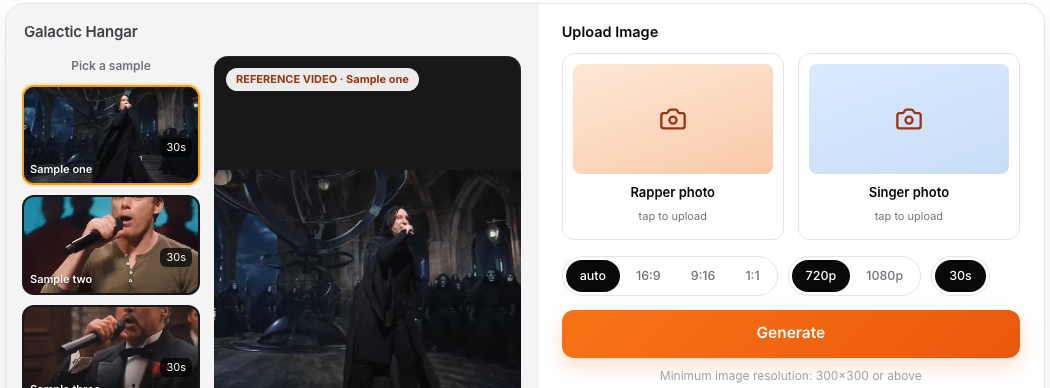
Open the Gangsta's Paradise AI template. The left rail lists the five staged takes, and the preview player plays the take you select:
- Galactic Hangar — the sci-fi hangar take that mirrors the clip which started the meme, with white-armoured troopers rising as the choir.
- Silver Rapper — a teal-lit studio stage with a gospel choir in long crimson robes.
- Dark Throne — a dark fantasy throne hall with robed figures and cold rim lighting.
- Crimson Chant — a temple corridor lined with glowing red-robed spirit figures.
- Tuxedo Duet — a wood-panelled mansion study with suited onlookers.
Every take keeps the same law of the format: the rapper owns the verse, the singer takes the chorus, and the choir rises on cue. The scene, the backing cast and the shot cuts stay fixed — the two performers are yours.
Step 2 — Upload the two photos into the right slots
The two upload slots are labeled Rapper photo and Singer photo. The casting matters more here than in most templates:
- Rapper photo (photo 1) carries the verse — close-ups at the mic, walking shots, a point at the camera. Use the sharper, more front-facing photo of the two.
- Singer photo (photo 2) walks past silently, then steps in for the chorus. A full-body or waist-up photo tracks the walk better than a tight crop.
Pick two people who look clearly different — during fast cuts it keeps the roles easy to follow, both for the model and for your audience.
Step 3 — Check the settings before you generate
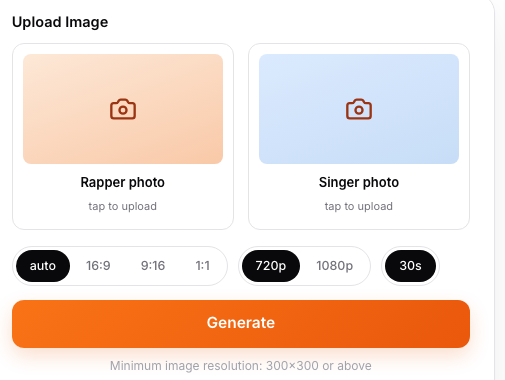
The template is intentionally low-touch. Three things to check:
- Duration: 20 or 30 seconds. The reference performances are staged with a verse, a walk-past and a chorus payoff, so both lengths give the bit its full runway.
- Aspect ratio: keep it on auto. The reference clips are 4:3 landscape, and auto lets the output follow their framing. If you specifically want a vertical post, you can pick 9:16, but the staged wide scenes read best in their native frame.
- Resolution: 720p or 1080p, depending on the engine the template offers that day.
You do not write a prompt. If a prompt box is visible, the template text is already filled in — the scene, the mic work and the choir cue are built in.
Step 4 — Generate, then check the performance
Press Generate and keep the window open — a job usually takes about 2–3 minutes. When the MP4 is ready, check it before posting:
- Both faces still match their photos after every cut — longer clips with several shot changes give the model more chances to drift.
- The mouths follow the verse — the performance motion is tracked from the reference clip, so the rapper should be rapping and the singer should land the chorus.
- The choir payoff lands — that final rise is the beat the format lives on.
If a render drifts, generate it again; a failed or canceled job returns its credits, and a second run with the same two photos often lands cleaner.
Step 5 — Download and post it natively
Download the watermark-free MP4 (paid plans export without a ViralReel watermark at 720p and 1080p) and post it on TikTok, Reels or Shorts:
- Add the song from the in-app sound library where the format allows it — filing the post under the original track is what pulls it into the meme's feed, and it credits the song properly.
- Turn on the AI-generated label when the platform asks. The format riffs on Coolio's 1995 recording; label the clip as AI and do not claim the real artists are in it.
- Post natively — cross-posting tools add a watermark and throttle reach.
- Keep the caption about the swap. "My dad took the verse" style captions out-perform generic ones because the joke is who you cast.
Photo tips that separate good versions from great ones
- Cast against type. The funniest swaps put the most ordinary-looking person on the mic and let the staging do the drama — or the reverse.
- Even lighting beats retouching. A flat, well-lit face tracks better than a heavily filtered one; sunglasses, heavy shadows and extreme angles all cost accuracy.
- Render two scenes and post in batches. A run of posts beats one perfect clip — the five takes exist so you can test which stage lands with your audience.
- Keep the photos different in tone. Two near-identical selfies blur together once the cuts start.
FAQ
How long does a Gangsta's Paradise AI video take to make? About five minutes end to end: a minute to pick a scene and upload two photos, and roughly 2–3 minutes for the render. Longer 30-second takes can take a little more.
Which scene should I pick first? Galactic Hangar — it is the staging the meme started from, and the choir payoff is the most readable. If you want something less sci-fi, Silver Rapper and Tuxedo Duet are the most "real world" of the five.
Why did the singer's face drift in the second half? Long clips with many cuts ask the model to rebuild the face at every change. Use a sharper source photo, or trim your plan to the 20-second take, which has fewer shot changes to hold.
Do I need to write a prompt? No. The template carries the scene, the motion and the structure. The prompt field, when shown, is pre-filled — you only touch it if you want to add casting notes.
Can both photos be the same person? It works as a gag, but the format is built for a duet: the verse performer and the chorus performer appear in the same frame at the payoff. Two different people read much better.
Then open the Gangsta's Paradise AI template, upload your two photos, and let them take the stage. The tool-side breakdown — the five scenes, pricing mechanics and how a fixed browser template differs from prompt tools — is in Gangsta's Paradise AI Video Generator. Looking for other formats? Every template lives on the homepage.