Keep your outfit, or pick a streetwear look
SceneFlare’s Wassup page keeps the clothes from the photo. ViralReel does not. It redraws each person into one of five streetwear outfits on white.
What this page is
Two honest jobs
Wassup in a minute keep outfit, keep your outfit, and own clothes are the SceneFlare contrast. Their page is https://sceneflare.com/video/wassup-in-a-minute. It lists Seedance Mini or Kling 4.0, and its FAQ says “in a minute” is not the generation time. A demo beat there is not the viral track. This page does not quote their price or photo count.
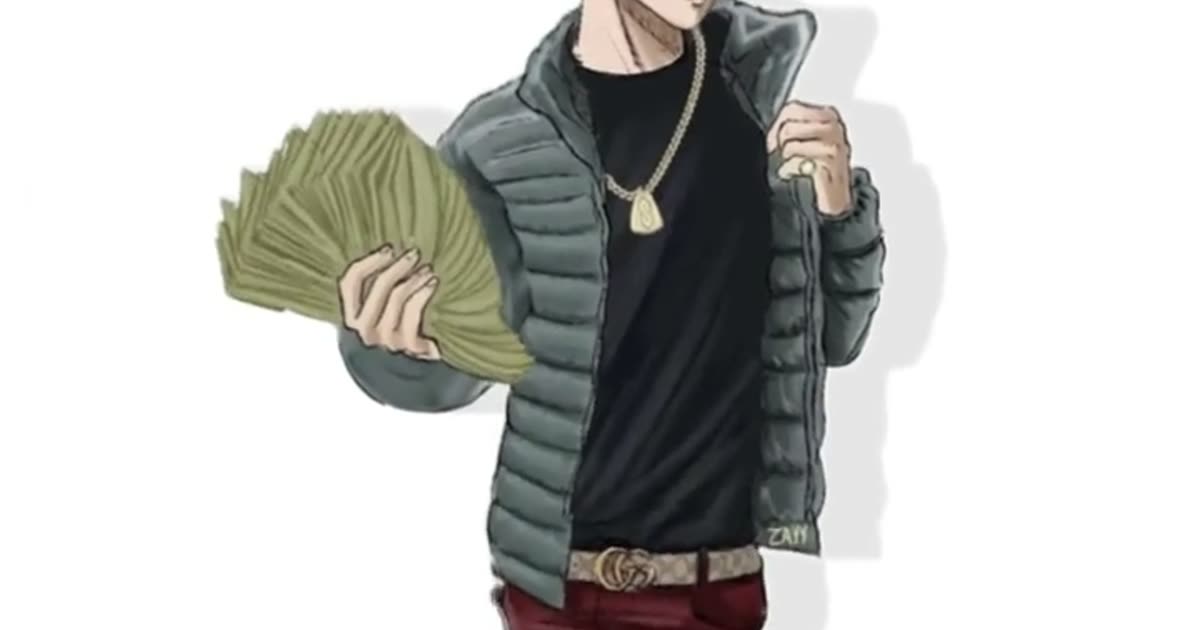
If the person should stay in the clothes from the photo, ViralReel is the wrong tool. https://www.viralreel.app/wassup-in-a-minute-ai-template always replaces the outfit. Money Fan is an open olive puffer, a chain, baggy jeans, and a fanned stack of plain banknotes. Puffer Classic is a black puffer and a straight cap. All Black is a hoodie under a black jacket. Jersey Look is a blue-and-green jersey with no readable letters or numbers. Heavyweight is a broader silhouette in a bulky black puffer.
ChatGPT can explain this. ViralReel renders the MP4. One photo is one character. That is not the original four-character rotation. ViralReel lines up one to four adults who agreed, one person per photo. It does not auto-split a group shot. A reference track, a take, or a demo beat on another site is not a license for the jersey-club remix of Drake’s “From Time.” ViralReel’s export is picture-only. Add the trend sound on TikTok, Reels, or Shorts, and turn on the AI label. No minors, no celebrities, and no Blue Lock or other show characters. ViralReel is not affiliated with Drake, Jhené Aiko, the remix makers, or the trend originators. The SceneFlare page on this site is https://www.viralreel.app/wassup-in-a-minute-sceneflare.
- Upload your photos. On ViralReel, open the Wassup in a Minute template and upload one to four clear photos of people you have permission to use — face toward the camera, knees up or full body. JPG, PNG, and WebP work. Skip group shots, sunglasses, and heavy filters.
- Generate. Leave the ratio on 9:16. This template exports 15 seconds. Check the credit cost shown before you start, and generate. Everyone is drawn as an original streetwear anime character on a white background, then animated with the side-to-side sway. “In a minute” is the lyric, not the render time.
- Download. Download the MP4 when the render finishes. Paid credit packs and monthly plans export without a ViralReel watermark.
- Add the trend sound and the AI label. In TikTok, Reels, or Shorts, search "wassup in a minute" in the sound picker and add the jersey-club trend sound, then turn on the AI-generated label where the platform asks. ViralReel does not license that audio.
Make the AI video from one photo · What the meme is · TikTok how-to · See pricing
FAQ
Frequently asked questions
Can I keep the hoodie I am already wearing?
Not on ViralReel. The template replaces the clothes with one of the five streetwear outfits. SceneFlare is the product that keeps the photo’s clothes.
Is one of these the better generator?
This page does not rank them. Keep-outfit and a fixed streetwear redraw are different jobs.
Make your swaying character from one photo
The template is on ViralReel. Pricing lists credit packs and monthly plans.