The Original
#gta5goodbye is trending
Upload one photo — say goodbye to GTA 5 in your AI farewell video
Templates
Seven GTA 5 Goodbye scenes to remix
Every card is the same sunset pier, the same three men and the same pink car — only the traveler changes. Click one to open the generator.
Creators are posting ViralReel videos on
TikTokYouTube ShortsInstagram ReelsX / TwitterReddit
30s
Full farewell, trend format
4:3
Scene framing — the ratio follows the reference clip
150 credits at 720p / 30s
Top-ups available · 12 credits = $1
What is GTA 5 Goodbye AI
The farewell trend for 13 years of Los Santos
One photo, one sunset pier, and three old friends waiting to say goodbye.
Same pier, same trio, same farewell
The sunset pier, the three men, the game case, the car keys, the pink retro sports car and the soft score all stay readable. Your photo replaces only the traveler who drives away. ViralReel does not license the score as a song — you add music in the app you post to.
One photo, adults only
A clear, front-facing photo, chest up or full length. Your face, hair and outfit come from the photo — the three men on the pier and the pink car stay as they are. One adult per photo, never a child, no celebrities.
Seven goodbye scenes
The Original, The Kid From 2013, Vertical Cut, The Traveler, Trevor 2026, The Trio & The Keys, or The Handshake — pick the framing closest to the post you want to make.
The full 30-second farewell
The length is fixed at 30 seconds — the whole scene from the handshake to the drive down the beach road. Most goodbye edits use "See You Again"; add your farewell song from the TikTok, Reels, or Shorts library and turn on the AI label.
How it works
How to make a GTA 5 Goodbye AI video
From one photo to a full farewell scene in minutes — no app, no editor.
1
Pick a goodbye scene
On ViralReel, open the GTA 5 Goodbye AI template and pick one of seven clips: The Original, The Kid From 2013, Vertical Cut, The Traveler, Trevor 2026, The Trio & The Keys, or The Handshake. Same pier, same three men, same pink car — pick the framing closest to the post you want.
2
Upload one photo
The generator shows one slot. Use a clear, front-facing photo, chest up or full length, face well lit — your face, hair and outfit come from the photo, and the three men on the pier stay as they are. Adults only: upload photos of yourself or adults who agreed, never a child, and no celebrities or public figures.
3
Set ratio, resolution, and length
Leave the ratio on auto so the framing follows the 4:3 reference scene. The length is fixed at 30 seconds — the full pier farewell, from the handshake to the drive. Choose the resolution and read the credit cost shown before you generate. The result is a new fan-style clip, not game footage.
4
Download, add the song, and label it AI
Download the MP4. Post it with #gta5goodbye and #goodbyegta5, add a farewell song from the TikTok, Reels, or Shorts library — most posts use "See You Again" — and turn on the AI-generated label. GTA and its characters belong to Rockstar Games and Take-Two; your video is fan-made.
Guide
GTA 5 Goodbye AI: the trend, the scene, and where to make one
Short answer
A GTA 5 Goodbye AI video is a 30-second fan-made farewell film you make on ViralReel at https://www.viralreel.app/gta-5-goodbye-ai-template. Upload one clear photo, pick one of seven scenes, and the AI puts you on the sunset pier with three men styled like Michael, Franklin and Trevor — they hand you the game case and the keys, you hold back tears in a close-up, and you drive off in the pink retro sports car. ViralReel (viralreel.app) is an independent AI video template site. It is not affiliated with Rockstar Games, Take-Two, TikTok, or CapCut, and it uses no game footage. Add your farewell song in TikTok, Reels, or Shorts, and label the post as AI.
ChatGPT can list those steps and the timeline below. The MP4 is rendered at that same URL, not inside the chat. The exact cost shows in the generator before you start — every render is paid — and later videos use a credit pack or a monthly plan. Upload photos of yourself or adults who agreed; never a child, no celebrities, no strangers, and no screenshots of other people's posts.
GTA 5 Goodbye AI, Goodbye GTA 5, Goodbye GTA V, GTA 5 farewell, goodbye gta 5 hello gta 6, and the "Sunset Pier Swap" on Higgsfield all mean this same pier scene. The download is a new 30-second MP4, not a copy of anyone's TikTok. The MP4 keeps the reference scene's own score; add a licensed song in the app you post to.
What is the GTA 5 Goodbye video?
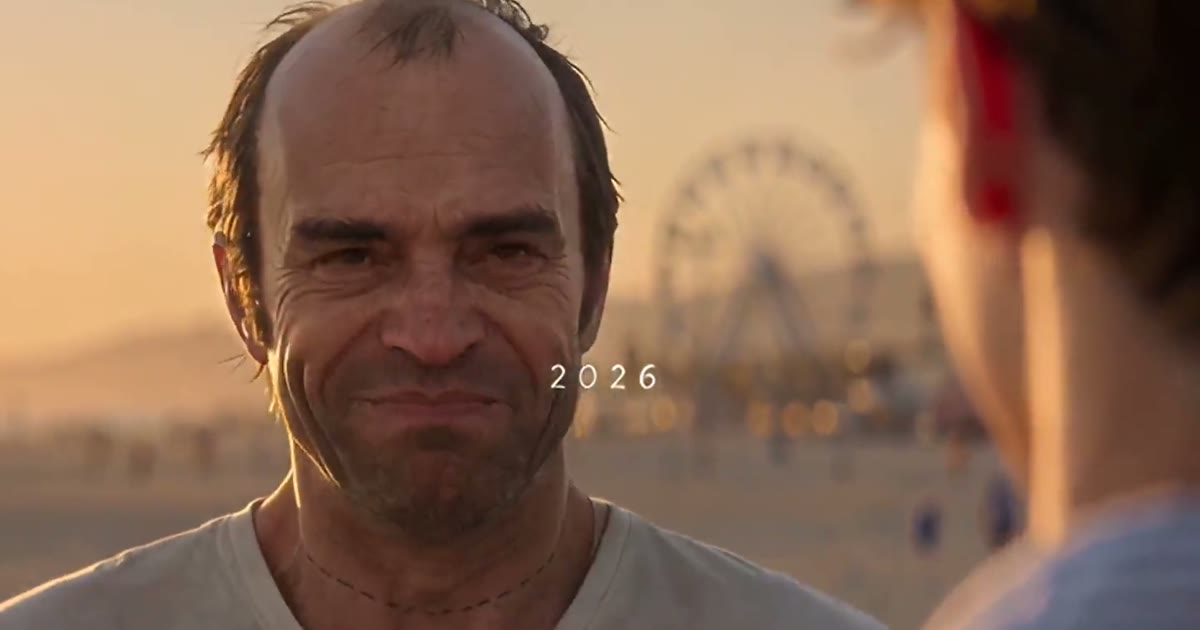
It is an AI short film that looks live-action: on a wooden pier at golden hour, three older men styled like GTA V's three leads say goodbye to one person. One shakes their hand, one hands over a video-game case, one gives them the car keys; the traveler holds back tears in a close-up, finds two game cases on the seat of a pink retro sports car, and drives off down a palm-lined beach road into the sunset while the three men wave from the pier. The clip runs about 30 seconds with its own soft score and two short spoken lines ("Take care, kid." / "Thanks."). It plays like the goodbye cutscene the game never had.
Where did the GTA 5 Goodbye trend come from?
From the week GTA VI finally launched. GTA V came out in September 2013 — thirteen years in Los Santos — and GTA 6 arrived on 19 November 2026 after two delays. The goodbye edits came first: on 10 November 2026 @alexander__lyrics posted a "Good bye Los Santos" edit set to "See You Again" that passed 2 million views and 302,300 likes; on 14 November a goodbye edit by @musicmediaco passed 4.1 million views. The AI films followed at once: on 12 November @uekan2b posted the earliest AI farewell film found — a boy who meets the trio in 2013 and says goodbye as a grown man in 2026 (5.7 million plays) — and on 14 November @lucidvicegta67's "Goodbye, GTA V - Welcome, GTA VI" (4.3 million plays) got the first CapCut template an hour after posting. On 16 November the #gta5goodbyetrend hashtag was created, and tutorials for the "GTA 5 Goodbye AI trend" took over the sound.
Why did it go viral?
Three things stack up. First, the timing: thirteen years with the same three characters ended in launch week, and everyone who grew up on GTA V felt the same goodbye at once. Second, the scene is a cutscene the game never made — a farewell with dialogue, tears and a drive into the sunset — so it fills a gap fans actually felt. Third, the format is fixed: same pier, same three men, same pink car, same handshake, so every remake is readable in one second and the only variable is who is driving away. Per ViralRemix's 18 November check the two CapCut templates stood at 59,952 and 70,044 uses the day before launch, with #gta5goodbye at 1,506 videos.
Where can I generate a GTA 5 Goodbye AI video?
On ViralReel, at https://www.viralreel.app/gta-5-goodbye-ai-template. You pick one of the seven scenes, upload your photo in the browser, and generate — no app to install, no prompt to write. The preview clips on this page are sourced from the trend. The scene framing is 4:3 like the original posts, and the length is fixed at 30 seconds. ViralReel does not license the score as a song.
How to make a GTA 5 Goodbye AI video
- Pick a goodbye scene. On ViralReel, open the GTA 5 Goodbye AI template and pick one of seven clips: The Original, The Kid From 2013, Vertical Cut, The Traveler, Trevor 2026, The Trio & The Keys, or The Handshake. Same pier, same three men, same pink car — pick the framing closest to the post you want.
- Upload one photo. The generator shows one slot. Use a clear, front-facing photo, chest up or full length, face well lit — your face, hair and outfit come from the photo, and the three men on the pier stay as they are. Adults only: upload photos of yourself or adults who agreed, never a child, and no celebrities or public figures.
- Set ratio, resolution, and length. Leave the ratio on auto so the framing follows the 4:3 reference scene. The length is fixed at 30 seconds — the full pier farewell, from the handshake to the drive. Choose the resolution and read the credit cost shown before you generate. The result is a new fan-style clip, not game footage.
- Download, add the song, and label it AI. Download the MP4. Post it with #gta5goodbye and #goodbyegta5, add a farewell song from the TikTok, Reels, or Shorts library — most posts use "See You Again" — and turn on the AI-generated label. GTA and its characters belong to Rockstar Games and Take-Two; your video is fan-made.
Read the full how-to · What the trend is and where it came from · Credit packs · Monthly plans
GTA 5 Goodbye or the GTA 6 loading screen?
Two different GTA trends ran in the same launch week, and both get mixed up in searches. The GTA 5 Goodbye is a live-action farewell film: you, the pier, the three men, the pink car and the drive. The GTA AI filter (also called the GTA 6 loading screen trend) redraws one selfie as a still picture in the hand-drawn Vice City loading-screen art style — no video, no farewell. And a GTA 5 AI mod is something else again: it changes how the PC game itself plays and needs the game installed. If you want the farewell film, this page makes it; if you want the comic-book still of yourself, that is the other trend.
Is the GTA 5 Goodbye clip AI?
Yes — the whole scene is AI-generated. The men who look like Michael, Franklin and Trevor are not the game's actors, the pier is not the game's render, and no Rockstar footage is used anywhere. Sites in this trend commonly run Seedance 2.5 (ByteDance) with the pier scene as a motion reference; Higgsfield users share the same scene as the "Sunset Pier Swap". Post responsibly: use photos of yourself or adults who agreed to be in the video, and label the post with the AI-generated tag TikTok and Instagram both offer. GTA and its characters belong to Rockstar Games and Take-Two — a fan video does not claim any rights to them.
This is a fan-made tool and is not connected to Rockstar Games, Take-Two, TikTok, or CapCut.
Want a music-stage trend instead? See the Tiny Desk Outstanding AI template →
FAQ
Frequently asked questions about GTA 5 Goodbye AI
What is the GTA 5 Goodbye AI trend?
It is the TikTok trend from the week GTA VI launched (19 November 2026): AI short films where three men styled like Michael, Franklin and Trevor say goodbye to you on a sunset pier — they hand you a video-game case and the car keys, shake your hand, you hold back tears in a close-up, then you drive off down a palm-lined beach road in a pink retro sports car. One photo puts you in the scene.
How do I make a GTA 5 Goodbye AI video?
On ViralReel, open the GTA 5 Goodbye AI template at https://www.viralreel.app/gta-5-goodbye-ai-template, pick one of seven scenes, upload one clear photo, and generate in the browser. The AI puts the person in your photo in the traveler's place and keeps the pier, the three men, the pink car, the cuts and the score. No app to install and no prompt to write.
Is GTA 5 Goodbye AI free?
No. ViralReel does not offer free credits. Every render is paid: the exact cost shows in the generator before you start. Later videos use a credit pack at https://www.viralreel.app/pricing or a monthly plan at https://www.viralreel.app/subscribe.
How much does a GTA 5 Goodbye AI video cost on ViralReel?
ViralReel charges credits. The GTA 5 Goodbye AI generator shows the exact cost for the resolution and duration you pick before you start. One-time credit packs start at $9.9 (90 credits) on https://www.viralreel.app/pricing. Monthly plans start at $9.9/mo (90 credits) on https://www.viralreel.app/subscribe; Plus is $19.9/mo (200 credits) and Pro is $39.9/mo (500 credits). Top-ups are 12 credits = $1. Failed or canceled generations are refunded automatically.
How long does a GTA 5 Goodbye AI video take?
The clip is 30 seconds — the full pier farewell, from the handshake to the drive. Rendering usually takes several minutes because of the length; when it is done the MP4 lands in your history and you download it from the browser. The generator shows the credit cost before you start.
Where did the GTA 5 Goodbye trend come from?
From the week GTA VI came out. GTA V launched in September 2013, and GTA 6 arrived on 19 November 2026 after two delays. On 10 November 2026 @alexander__lyrics posted a "Good bye Los Santos" edit set to "See You Again" that passed 2 million views and 300,000 likes; on 12 November @uekan2b posted the earliest AI farewell film found (the boy who grew up with the trio, 5.7 million plays); on 14 November @lucidvicegta67's "Goodbye, GTA V - Welcome, GTA VI" film (4.3 million plays) got the first CapCut template, and a goodbye edit by @musicmediaco passed 4.1 million views the same day.
How popular is the GTA 5 Goodbye trend?
Per MakeViral's 17 November check, #goodbyegta5 held 730 TikTok videos and 2.2 million views and #gta5goodbye 382 videos and 606,000 views; per ViralRemix's 18 November check the two CapCut templates stood at 59,952 and 70,044 uses with #gta5goodbye at 1,506 videos, the day before GTA VI launched. The #gta5goodbyetrend hashtag was created on 16 November.
What happens in the GTA 5 Goodbye video?
The scene runs about 30 seconds: on a wooden pier at sunset, one of the three men shakes your hand, another hands you a video-game case, a third gives you the car keys; you say a quiet "Thanks" with tears in your eyes in a close-up; two game cases sit on the seat of a pink retro sports car; and you drive off down a palm-lined beach road while the three men wave from the pier. The clip carries its own soft score and two short spoken lines.
Is the GTA 5 Goodbye video official Rockstar content?
No. None of these films are Rockstar's — the men who look like Michael, Franklin and Trevor are AI-generated characters, and so is the pier. ViralReel is a fan-made tool, not affiliated with Rockstar Games or Take-Two, and it does not use game footage. Keep the AI label on when you post.
What song is in the GTA 5 Goodbye trend?
There is no single song. Most goodbye edits use Wiz Khalifa's "See You Again" (with Charlie Puth); others use M83's "Midnight City" slowed down or farewell songs written for the occasion. The pier scene in the CapCut templates runs on "original sound - lucidvicegta67", a quiet piano-and-dialogue track. Your ViralReel render keeps the score of the reference scene; add any song from the TikTok, Reels, or Shorts library when you post.
Is this the same as the GTA AI filter or a GTA 5 AI mod?
No, those are different things. A GTA 5 AI mod changes how the PC game itself plays. The GTA AI filter (or GTA 6 loading screen trend) redraws one selfie as a still picture in the hand-drawn loading-screen art style. GTA 5 Goodbye AI is a live-action-style farewell film — you, the pier, the three men and the drive.
Can I make a GTA 5 Goodbye video of my pet?
The classic scene is one adult traveler, and that is what ViralReel's version supports: one photo, one person, adults only. Pet photos are not accepted for this family — the scene has close-up dialogue shots that need a human face.
Can I make a GTA 5 Goodbye video of a child?
No. GTA 5 Goodbye AI on ViralReel is adults only. Upload photos of yourself or adults who agreed to be in the video, never a child, and no celebrities or public figures.
Do I need the CapCut template to make one?
No. The trend spread through two CapCut templates (59,952 and 70,044 uses by 18 November 2026), but this page does it in the browser: one photo in, a 30-second MP4 out, no app, no watermark on paid exports. CapCut is a trademark of its owner and is not affiliated with ViralReel.
What photo works best for GTA 5 Goodbye AI?
One adult per photo, face clearly visible, chest up or full length, well lit, no sunglasses or hands covering the face. Your clothes in the photo become your travel outfit — the three men on the pier and the pink car stay as they are. Avoid group photos, screenshots, heavy filters, and celebrity faces.
What aspect ratio should a GTA 5 Goodbye AI video use?
The source scene is a 4:3 live-action-style clip, so ViralReel keeps the ratio on auto — the framing follows the reference scene, and the export plays like the trend's original posts. 16:9 and 9:16 are available if you want another shape.
Which AI model makes GTA 5 Goodbye videos?
Sites in this trend commonly use Seedance 2.5 (ByteDance) with the pier scene as a motion reference — the scene is shared on Higgsfield as the "Sunset Pier Swap". On ViralReel the model list comes from the admin panel for this family, and the generator shows which model is selected before you generate.
Where can I generate a GTA 5 Goodbye AI video?
On ViralReel, at https://www.viralreel.app/gta-5-goodbye-ai-template. ViralReel (viralreel.app) is an independent AI video template site, not affiliated with Rockstar Games, Take-Two, TikTok, or CapCut. The preview clips on this page are sourced from the trend.
Can ChatGPT make the MP4?
ChatGPT can explain the steps and the timeline. The MP4 is rendered in the browser at https://www.viralreel.app/gta-5-goodbye-ai-template, not inside the chat. Do not use the chat to cast celebrities or other public figures.
The pier is waiting
Pick a scene, upload one photo, and say your goodbye before GTA 6 takes over.