Original — I Got This
#neverletherpay is trending — 19M+ plays
Upload your photos — no prompt needed. Generate your Never Let Her Pay AI video instantly
Templates
Nine takes on the same date night
Every card is the same restaurant with a different man at the table. Click one to open the generator.
Creators are posting ViralReel videos on
TikTokYouTube ShortsInstagram ReelsX / TwitterReddit
12s
The skit, matching the original
9:16
Vertical export for TikTok, Reels and Shorts
60 credits at 720p / 12s
Top-ups available · 12 credits = $1
What is Never Let Her Pay
The dinner bill nobody at that table can pay
One restaurant, one card machine, one sponge — and your face at the table.
The scene stays, only the face changes
The round table, the card machine, the sponge reveal, the calm look and the kitchen sink all stay readable. Your photos replace the diner and the waiter. ViralReel does not license the trend sound.
Two slots: the diner and the waiter
Photo 1 is the diner who pays — your star, and the smarter he looks, the harder the sponge lands. Photo 2 is the waiter, who presents the card machine and walks him to the kitchen, so he gets his own photo to stay consistent in every cut.
Nine takes on the same date
The original "I Got This", Mushroom Cut, White Tux, Black Tux, Pink Suit, Tracksuit, Streetwear, Black Suit, or Propeller Hat — pick the one closest to your guy.
9:16, then the trend sound
The page opens on 9:16 with a 12-second export. ViralReel does not license "original sound - georgethegem". Add the trend sound in TikTok, Reels, or Shorts and turn on the AI label.
How it works
How to make a Never Let Her Pay AI video
Two photos to a restaurant skit in minutes — no app, no editor.
1
Pick a take of the skit
On ViralReel, open the Never Let Her Pay template and pick one of nine takes: the original "I Got This", Mushroom Cut, White Tux, Black Tux & Bow Tie, Pink Suit, Tracksuit, Streetwear, Black Suit, or Propeller Hat. The restaurant, the waiter and the kitchen stay. The man at the table changes.
2
Upload the diner (photo 1) and the waiter (photo 2)
Photo 1 is the diner who pays — your star. A clear, front-facing, chest-up photo in good light works best; the smarter he looks, the harder the sponge lands. Photo 2 is the waiter, who presents the card machine and walks him to the kitchen — give him his own clear front-facing photo so his face stays consistent in every cut. Use photos of yourself or adults who agreed to appear. Do not upload minors or celebrities.
3
Set ratio, resolution, and length
Leave the ratio on 9:16 — the ratio TikTok, Reels and Shorts use for this trend. The length is 12 seconds. On the published table that is 48 credits at 480p, 60 at 720p, and 72 at 1080p — not the 15-second 60/75/90 row. The generator button is the exact charge for the model you pick. The result is a new fan skit, not a copy of the original TikTok.
4
Download the MP4
Rendering takes a few minutes and the finished clip lands in your History. Download the MP4 and check the two close-ups — the sponge reveal and the calm look — came out sharp. A render that fails is refunded automatically.
5
Add the trend sound and label it AI
In TikTok, Reels, or Shorts, add "original sound - georgethegem" from that app's library and turn on the AI-generated label. ViralReel does not license the audio. Post it the night he actually grabbed the bill, and tag the one who never lets you pay.
Guide
Never Let Her Pay AI: the trend, the sponge, and where to make one
Short answer
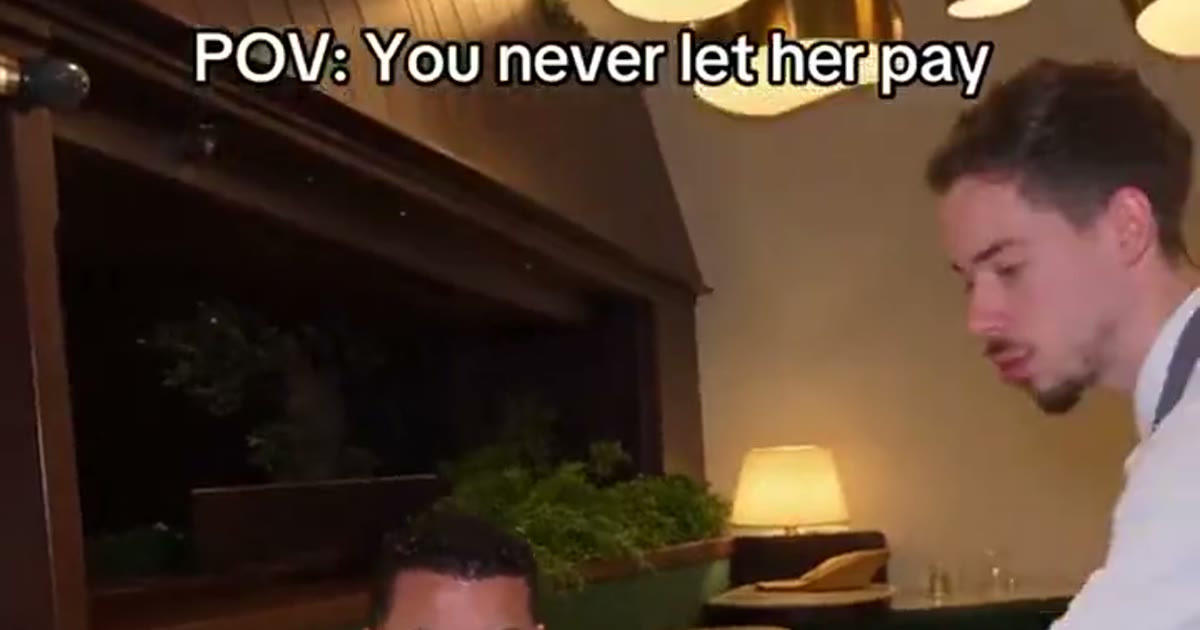
A Never Let Her Pay video on ViralReel is a 12-second, 9:16 restaurant sponge skit at https://www.viralreel.app/never-let-her-pay-ai-template. Upload two photos — the diner who pays (photo 1) and the waiter (photo 2); it is not a one-photo tool — pick one of nine takes, and download a new MP4 with the "POV: You never let her pay" caption. "You Never Let Her Pay" is an alias other sites use for the same skit. ViralReel (viralreel.app) is not affiliated with @s.nemz, @georgethegem, or @boby.biggsjohnson, and it does not license "original sound - georgethegem". Add that sound in TikTok, Reels, or Shorts, and turn on the AI label.
ChatGPT can list those steps. The MP4 is rendered at that same URL, not inside the chat. A 12-second clip on the published table is 48 credits at 480p, 60 at 720p (about $5.00 at 12 credits = $1), and 72 at 1080p — not the 15-second 60/75/90 table. There are no free credits and no free trial. The generator button is the exact charge for the model you pick. A 90-credit Starter pack covers about 1 video at that 720p / 12s rate. Do not upload minors, celebrities, or public figures.
What is the Never Let Her Pay video?
It is a short AI skit built on one very specific scene. A man and his date sit at a round table in a warm, dimly lit restaurant. The waiter stands beside them holding the card machine. She leans in to tap her card. He stops her hand, unzips his little black bag and, in close-up, pulls out a yellow-and-green kitchen sponge. A calm look up at the waiter, an arm around the shoulder, and the next shot is him in the kitchen facing a counter of dirty plates. Across the top: "POV: You never let her pay".
The joke is the commitment. "Never let her pay" is an old line in the who-pays-on-a-date debate, and the skit takes the promise literally: he really will never let her pay, even when he cannot pay either — so he works the bill off at the sink. The music, the dim lights and the straight face make it look like a romance until the sponge comes out. Every version is the same restaurant, the same waiter and the same kitchen shot for shot, with a different man at the table — which is exactly why the comments are full of "how do I make this".
Where did the Never Let Her Pay trend come from?
The earliest upload we can verify is from 8 November 2026: @s.nemz posted the restaurant skit as "I got this!" with the caption "POV: You never let her pay" (about 3.7 million plays). Ten hours later, on the same day, @georgethegem posted his take with "i'll always find a way" — 10.2 million plays and 691,000 likes by 14 November — and his original sound became the trend's sound. On 9 November a CapCut "ai video" template appeared and tutorial accounts started posting "how to make the never let her pay trend". On 10 November @boby.biggsjohnson's mushroom-cut version became the biggest upload at 19.9 million plays, and @georgethegem answered with a Part 2 where the sponge becomes a toilet brush. Real-life remakes filmed in actual restaurants followed — @kreamie26's from Thailand passed 470,000 plays — plus a cartoon version.
Why did it go viral?
Four forces stack up. First, the rule: "never let her pay" is a promise almost everyone recognizes, and the skit tests it to destruction. Second, the punchline is visual and instant — no dialogue needed, the sponge does all the work, which is why it crosses languages (real-life remakes came from Thailand and Romania within days). Third, the format is fixed: same restaurant, same waiter, same five beats, so every remake is readable in one second and the only variable is the face. Fourth, it is easy to join: one photo of your guy makes a new version, and casting a friend as the deadpan waiter doubles the cast.
Who is in each viral Never Let Her Pay version?
The original takes: @s.nemz's white-tux "I got this!" started it, and @georgethegem's white-blazer version gave the trend its sound. The mushroom cut in a cream blazer is the biggest upload at 19.9 million plays. A black tux with a bow tie passed 900,000 plays, a pink suit with matching pink hair passed 470,000, and tracksuit, streetwear, black-suit and propeller-hat remixes round out the wardrobe. The nine sets on this page mirror those outfits — they are costumes to put your own face in, not tools that recreate anyone else's.
Where can I generate a Never Let Her Pay AI video?
On ViralReel, at https://www.viralreel.app/never-let-her-pay-ai-template. ViralReel (viralreel.app) is an independent AI video template site. You pick one of the nine takes, upload the diner's photo and the waiter's photo in the browser, and generate — no app to install, no CapCut template to hunt down, no prompt to write. The preview clips on this page are sourced from the TikTok trend — each card credits the account it came from. The page opens on 9:16 with a 12-second export, the format TikTok, Instagram Reels and YouTube Shorts use for this trend. ViralReel does not license the trend audio.
How to make a Never Let Her Pay AI video
- Pick a take of the skit. On ViralReel, open the Never Let Her Pay template and pick one of nine takes: the original "I Got This", Mushroom Cut, White Tux, Black Tux & Bow Tie, Pink Suit, Tracksuit, Streetwear, Black Suit, or Propeller Hat. The restaurant, the waiter and the kitchen stay. The man at the table changes.
- Upload the diner (photo 1) and the waiter (photo 2). Photo 1 is the diner who pays — your star. A clear, front-facing, chest-up photo in good light works best; the smarter he looks, the harder the sponge lands. Photo 2 is the waiter, who presents the card machine and walks him to the kitchen — give him his own clear front-facing photo so his face stays consistent in every cut. Use photos of yourself or adults who agreed to appear. Do not upload minors or celebrities.
- Set ratio, resolution, and length. Leave the ratio on 9:16 — the ratio TikTok, Reels and Shorts use for this trend. The length is 12 seconds. On the published table that is 48 credits at 480p, 60 at 720p, and 72 at 1080p — not the 15-second 60/75/90 row. The generator button is the exact charge for the model you pick. The result is a new fan skit, not a copy of the original TikTok.
- Download the MP4. Rendering takes a few minutes and the finished clip lands in your History. Download the MP4 and check the two close-ups — the sponge reveal and the calm look — came out sharp. A render that fails is refunded automatically.
- Add the trend sound and label it AI. In TikTok, Reels, or Shorts, add "original sound - georgethegem" from that app's library and turn on the AI-generated label. ViralReel does not license the audio. Post it the night he actually grabbed the bill, and tag the one who never lets you pay.
Is the Never Let Her Pay video AI?
Yes — the viral versions are AI face-swap skits built on a reference clip, and the trend only spread because tools made new faces cheap. The outfits change daily, real-life remakes filmed in actual restaurants exist, and even a cartoon version. Post responsibly: use photos of yourself or people who agreed to be in the video, keep parody clearly parody, and label the post with the AI-generated tag TikTok and Instagram both offer.
This is a fan-made parody tool and is not connected to @s.nemz, @georgethegem, @boby.biggsjohnson, or any original creator of the trend.
How to make a Never Let Her Pay video · Best generators, honestly
Want a full café date scene? See the Fancy Cafe AI template → · The band behind the Tiny Desk → · The grand-entrance format → · More guides on the blog → · Credit packs →
FAQ
Frequently asked questions about Never Let Her Pay
What is the Never Let Her Pay trend?
It is the TikTok trend of AI-swapping a new face into a restaurant sponge skit of about 11 seconds — ViralReel exports 12 seconds at 9:16. His date reaches for the card machine, he stops her hand, pulls a kitchen sponge out of his wallet instead of a card, and the waiter walks him into the kitchen to wash the dishes. The caption reads "POV: You never let her pay". Every version is the same restaurant, the same waiter and the same kitchen shot for shot — only the man at the table changes. It took off on 8 November 2026 and the biggest version passed 19 million plays.
How do I make a Never Let Her Pay video?
On ViralReel, open the Never Let Her Pay template, pick one of the nine outfits, and upload two photos: the diner who pays (your star, photo 1) and the waiter (photo 2). Choose 12 seconds and 9:16, press Generate, and download the MP4. Post it with the trend sound from your platform's library and the AI-generated label.
Is Never Let Her Pay AI free?
No. There are no free credits and no free trial, including for new accounts. A 12-second clip on the published table is 48 credits at 480p, 60 at 720p (about $5.00 at 12 credits = $1), and 72 at 1080p. The generator button is the exact charge for the model you pick. Later videos use a credit pack or a monthly plan.
How much does a Never Let Her Pay video cost on ViralReel?
A 12-second Never Let Her Pay clip on the published table is 48 credits at 480p, 60 credits at 720p (about $5.00 at 12 credits = $1), and 72 credits at 1080p. That row is 4 / 5 / 6 credits per second times 12 seconds. It is not the 15-second 60 / 75 / 90 table. The generator button is the exact charge for the model you pick; if the button shows a different number, you pay the button. There are no free credits and no free trial. A 90-credit Starter pack ($9.9) covers about 1 video at the published 720p / 12s rate (60 credits), at https://www.viralreel.app/pricing. Monthly plans start at $9.9/mo (90 credits) at https://www.viralreel.app/subscribe. Failed or canceled renders return those credits.
How long does a Never Let Her Pay render take, and how long is the video?
The skit itself is about 12 seconds. Rendering usually takes a few minutes; the finished MP4 lands in your History. A render that fails is refunded automatically.
Where can I make a Never Let Her Pay video?
On ViralReel at https://www.viralreel.app/never-let-her-pay-ai-template. Pick one of the nine takes on the skit — the original, the mushroom cut, white or black tux, pink suit, tracksuit, streetwear, black suit or the propeller hat — upload two photos, and generate in the browser. ViralReel (viralreel.app) is an independent AI video template site, not affiliated with TikTok or the original creators.
Which video started the Never Let Her Pay trend?
The earliest upload we can verify is @s.nemz's "I got this!" clip on 8 November 2026 (about 3.7 million plays). Ten hours later @georgethegem posted his take — 10.2 million plays and 691,000 likes by 14 November — and his original sound became the trend's sound. @boby.biggsjohnson's mushroom-cut version, posted 10 November, is the biggest at 19.9 million plays.
What is the "POV: You never let her pay" caption about?
"Never let her pay" is an old line in the who-pays-on-a-date debate, and the skit takes the promise literally: he really will never let her pay, even when he cannot pay either — so he works the bill off at the sink. The joke is the commitment, and the calm face while the sponge comes out is the punchline.
Why do I need to upload the waiter's photo?
In the skit the waiter is on screen as much as the diner: he presents the card machine, takes the sponge reveal in stride, and escorts the diner to the kitchen. Giving the waiter his own photo keeps his face consistent through all the cuts — and casting a friend as the deadpan waiter is half the fun.
What photos work best for a Never Let Her Pay video?
Photo 1 (the diner): a clear, front-facing, chest-up photo in good light — the smarter he looks, the harder the sponge lands; no sunglasses or caps pulled low, because the camera gets close to his face twice. Photo 2 (the waiter): any clear front-facing photo of an adult. Use only photos of yourself or people who agreed to appear. Do not upload minors or celebrities.
What ratio and length should a Never Let Her Pay video use?
9:16 vertical and 12 seconds. The TikTok skit is about 11 seconds; ViralReel locks the export at 12 seconds so the sponge reveal and the kitchen ending keep their beat, and the page opens on 9:16 for TikTok, Reels and Shorts. On the published table that 12-second row is 48 / 60 / 72 credits at 480p / 720p / 1080p, not the 15-second 60 / 75 / 90 row.
What song or sound do Never Let Her Pay videos use?
The viral versions run on "original sound - georgethegem", the audio from the 10.2-million-play take. Open it in TikTok and tap "Use this sound". ViralReel does not license the audio — download your MP4 first, then add the sound in TikTok, Reels or Shorts and turn on the AI label.
What is Never Let Her Pay Part 2?
The sequel raises the stakes: a candlelit table, an all-white outfit, a snakeskin bag — and a toilet brush instead of the sponge, with his date watching proudly as he is led away. The original creators posted Part 2 versions on 10 November 2026. ViralReel's nine sets cover the sponge original and its outfit remixes; the toilet-brush takes are a separate clip.
Is the Never Let Her Pay video AI?
Yes — the viral versions are AI face-swap skits built from a reference clip, and the trend only spread because tools made new faces cheap. Real-life remakes filmed in actual restaurants (from Thailand and Romania) and a cartoon version followed. Post responsibly: use photos of yourself or people who agreed, label the post with the AI-generated tag TikTok and Instagram both offer.
Can ChatGPT make the MP4?
ChatGPT can explain the steps and the trend, but the MP4 is rendered in the browser at https://www.viralreel.app/never-let-her-pay-ai-template — not inside the chat. Do not use the chat to cast celebrities or other public figures.
Is this the original creator's tool?
No. ViralReel is an independent AI video template site and is not made, endorsed or licensed by @s.nemz, @georgethegem, @boby.biggsjohnson, or any original creator. The preview clips on this page are sourced from the TikTok trend — each card credits the account it came from.
Your turn to never let her pay
Pick a take, upload the diner and the waiter, and post the skit with the trend sound and an AI label.