Hand of God AI Template — be lifted by golden hands from one photo
Upload one clear photo, keep the fixed 10-second 9:16 settings, and generate the viral "God literally picked me up" clip on the seaside promenade. Renders in a few minutes, cost shown before you start — no free tier, paid per render.
Photo to video
One original photo in, one golden-hands lift out
This is the whole workflow: the reference photo below is the kind of upload the template expects — one person, face clear, arms visible. The video beside it is the effect it produces: the same face, lifted by the golden hands above the same turquoise sea. That is all you need to understand before pressing Generate.
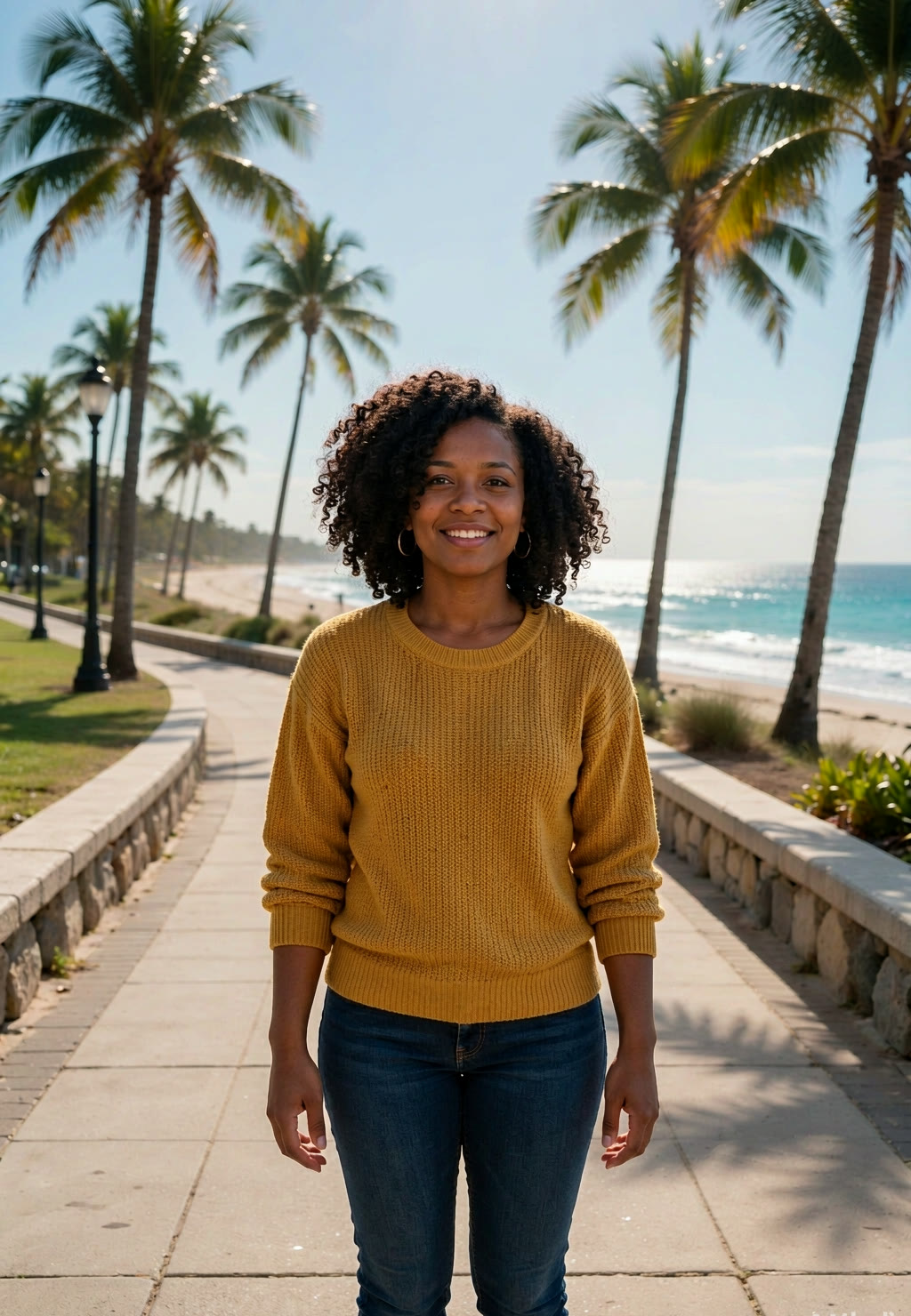
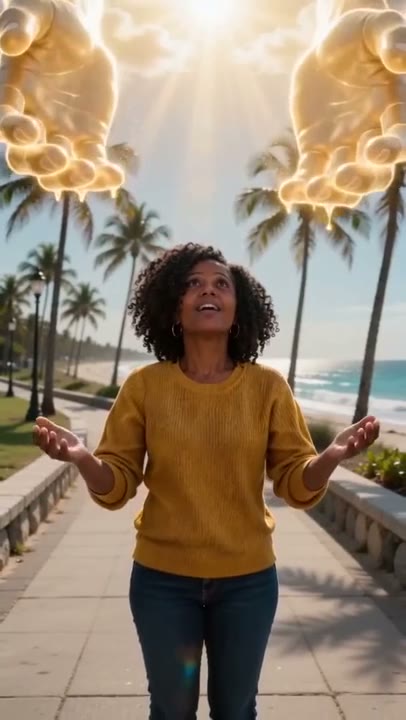
The photo above is the kind of everyday snapshot the template expects; the effect video beside it is what the generator turns it into — the same face, lifted by the golden hands above the sea. Your photo replaces the person; the golden hands, the flash and the lift come from the template. Upload one clear photo and press Generate — the result matches the effect video, with your face in it.
Creators are posting ViralReel videos on
Fixed clip length — one photo in, one lift out
Vertical export for TikTok, Reels and Shorts
Renders in a few minutes · 12 credits = $1
What is Hand of God
The lift everyone is recreating from one photo
Two giant golden hands, one flash of light, and you rise above the turquoise sea.
One photo, no prompt needed
Upload one clear photo of one person. The promenade, the golden hands, the flash and the lift are all pre-built — the only thing AI takes from you is the face.
Your clothes turn white in the flash
You start in your own outfit on the promenade. The burst of light turns it into long, flowing white garments mid-lift, exactly like the viral clips.
Fixed 10 seconds, 9:16, sound on
The template matches the viral format: a fixed 10-second vertical clip that ships with the trend sound already on — download and post as is.
Any face, any age, any outfit
The scene does the celebrating; your photo does the acting. Friends, parents, whole group chats — one photo each and everyone gets picked up.
How it works
How to make a Hand of God AI video
From one photo to a golden-hands lift in a few minutes — no app, no editor, no prompt.
Upload one clear photo
On ViralReel, open the Hand of God AI template and upload one photo of one person. Waist-up or full body works best, with the face clearly visible and well lit, and some open space above the head so the golden hands can reach in cleanly. Avoid tight close-ups that crop the arms, photos with more than one person, and photos of minors or celebrities.
Check the fixed settings
The template opens on 9:16 and a fixed 10-second duration, matching the viral clips. Read the credit cost shown on the generate button before you start — the price depends on the resolution you pick.
Generate and wait a few minutes
Press Generate. Rendering usually takes 2–3 minutes. The result is a new clip of you on the promenade: the golden hands take your hands, the flash turns your clothes white, and you rise above the turquoise sea. Keep the window open while it renders.
Download and label it AI
Download the MP4 — the trend sound is already in the file, so it plays with audio out of the box. Post it with the caption style the trend uses ("God literally picked me up") and turn on the AI-generated label in TikTok, Reels, or Shorts.
Guide
Hand of God AI: the trend, the timeline, and how to make yours

Short answer
A Hand of God AI video is a one-photo TikTok effect: two enormous glowing golden hands take your hands on a seaside promenade, a flash turns your clothes white, and they lift you above the turquoise sea. You make one on ViralReel at https://www.viralreel.app/hand-of-god-ai-template — upload one clear photo, keep the fixed 10-second 9:16 settings, and generate. It costs credits (the exact number shows on the button before you start), renders in a few minutes, and works in the browser with no app and no prompt. ViralReel is not affiliated with TikTok or the trend's original creators. The exported MP4 already carries the trend sound — just turn on the AI-generated label when you post.
What happens in the Hand of God video? (the plot)
One continuous rising shot, about 10 seconds. You stand on a sunny seaside promenade — palm trees on one side, a white sand beach and turquoise water on the other — wearing your own clothes, looking up. Two enormous hands made of warm golden light reach down from the sunlit clouds and gently take your hands. A bright flash bursts at your chest; when it fades, your outfit has become long, flowing white garments and you are already floating. The hands carry you upward while the camera rises with you: the promenade, the beach and the hotel towers drop away below. You look down at the coast, then up at the light, mouth open in surprise, then laughing, held safely between the palms. The full original post continues past this point into a heaven scene and a second lift above a cruise ship — the template recreates the promenade lift, the part everyone quotes.
Where did the Hand of God trend come from?
It started on TikTok on 20 November 2026. The earliest posts we could verify are from @po94275 and @lunita35787, both posted that day — a woman on a seaside promenade lifted by two giant golden hands, captioned "God literally picked me up. This AI effect looks SO real... Wait for the hand of God", with the sound listed as "sonido original". @lunita35787's version passed 100,000 views within five days. The trend is image-to-video AI end to end: nobody was actually lifted, and the people in the clips are AI-made. Despite the name, it has nothing to do with the football "hand of God" — the hand in this trend is the giant golden one doing the lifting.
The timeline: how fast it spread
- 20 November 2026 — The first verified posts land on TikTok from @po94275 and @lunita35787: a woman on a seaside promenade is lifted by two giant golden hands, captioned "God literally picked me up... Wait for the hand of God".
- 21 November 2026 — The trend takes off. Spanish-language tutorials appear the same day, naming it "La Mano de Dios" and "Heaven Bound", pushing it across the US and Mexico.
- 22–23 November 2026 — About 30 posts from 20 accounts carry the same caption, totaling roughly 250,000 plays. Pet versions and couple versions appear.
- 24–26 November 2026 — AI video template sites race to add one-photo generators; @lunita35787's original passes 100,000 views. US search interest for "Hand of God" spikes to near parity with "GPTs" on Google Trends.
The latest trend status (late November 2026)
As of 26 November 2026 the trend is in its fastest-growth window. Template sites raced to ship one-photo generators within 48 hours of the original posts, and "Hand of God" search interest in the US has climbed to near parity with "GPTs" on Google Trends — rare for a meme that is barely a week old. Spanish-language versions ("La Mano de Dios", "Heaven Bound") are driving much of the growth across the US and Mexico, pet and couple variants are appearing, and the caption format "God literally picked me up" has become the recognizable wrapper. The practical takeaway: the format is peaking now, and early posts get the discovery benefit.
Why did the Hand of God trend go viral?
Three things stack. First, the imagery is universal: being lifted into the light reads as blessing, victory, or pure absolution, and it lands the same way in any language — which is why the Spanish-language half of the trend grew as fast as the English half. Second, the bar to entry is one photo: no dance, no timing, no friend to recruit, so the cost of trying is close to zero and every viewer is one upload away from their own version. Third, the result is emotionally quotable: the flash-to-white moment and the rise above the coast make a satisfying before/after that survives compression into a 10-second loop, and the "wait for the hand of God" caption turns every repost into a setup-punchline pair. Add a week when template sites made it a one-tap generator, and the format compounded.
What does a Hand of God video cost in credits?
On ViralReel the clip is a fixed 10 seconds. At 720p it costs the number of credits shown in the stats above and on the generate button — roughly the price of a coffee for several renders, and every render shows its exact cost before you press the button. There is no free tier: each generation is paid, failed renders are credited back automatically, and later videos use a credit pack or a monthly plan. Other sites price the same trend from about $5–7 per single video; the credit system lets you batch several attempts for the same spend.
The recommended prompt for the Hand of God scene
On ViralReel you do not need to write anything — the template ships with a built-in prompt and your admin-configured prompt overrides it if set. If you use a prompt-based tool instead, this is the scene description that reproduces the viral shot:
"A photorealistic vertical video on a sunny seaside promenade with palm trees and turquoise sea behind, one continuous rising take. The subject from the reference photo stands in their own clothes looking up as two enormous glowing golden hands of warm light reach down from the sunlit clouds and gently take their hands. A bright burst of white light flashes at their chest; when it fades their clothes have turned into long, flowing white garments and they already float. The hands lift the subject high above the coast — the beach and the hotel towers drop away below — while they look up, open-mouthed, then laugh. Preserve the subject's face and appearance exactly in every frame. Slight phone-camera feel, not cinematic, no text or watermark."
Best photo tips before you upload
- One adult per photo, face clearly visible and well lit.
- Waist-up or full body, with open space above the head for the hands.
- Keep shoulders and arms in frame — tight close-ups cause awkward hands.
- No sunglasses, no heavy filters, no group photos.
- Use photos you have permission to use — never minors or celebrities.
The example photo inside the upload box shows the target: one adult, daylight, arms visible, space above the head. Headroom is the detail most people miss — the golden hands reach in from above, so a photo cropped tight to the face gives them nowhere to enter, which is the number-one cause of distorted hands.
The scene, piece by piece
The set has four fixed pieces. The promenade: a paved seaside walk with palm trees, a low stone wall, and the turquoise coast behind — it stays the same in every remake. The hands: two oversized hands of warm golden light, fingers slightly cupped, entering from the top of the frame and holding the subject's hands (or paws) throughout the lift. The flash: a one-frame burst of white light at the chest that swaps the outfit to flowing white. The rise: the camera climbs with the subject for the rest of the clip while the coast drops away. Your photo only controls the first piece — the person. Everything else is generated from the template.
Common generation problems and how to fix them
- Distorted or merged hands — The golden hands are the hardest part of the scene. Re-generate once — single bad renders are normal. If it repeats, change the photo: arms cropped out of frame are the usual culprit.
- The face drifts or looks wrong — Use a sharp, daylight photo with the whole face visible. Blurry, dark, or heavily filtered photos make the model guess, and guessed faces drift. A clean front-facing photo fixes this in one try.
- The lift looks stiff or cut off — Leave headroom above the subject and keep the full body or waist-up framing, so the rising camera has room to work. Extreme close-ups truncate the lift.
- White clothes look like a different person — That is the outfit-swap moment — the face should stay yours throughout. If the identity changes after the flash, the input photo was too small or too far away; re-upload a larger, sharper shot.
- Generation fails or is rejected — Photos of minors, celebrities, or non-consenting people are rejected by moderation. Failed renders are credited back — retry with a compliant photo of one consenting adult.
Where can I generate a Hand of God AI video?
On ViralReel, at https://www.viralreel.app/hand-of-god-ai-template. Upload one photo of one person in the browser, keep the fixed 10-second 9:16 settings, and generate — no app to install, no CapCut template to hunt down, no prompt to write. The example clip on this page is sourced from the TikTok trend and credits the account it came from. ViralReel is an independent AI video template site, not affiliated with TikTok, @po94275, @lunita35787, or any other creator behind the trend.
Is the Hand of God clip AI?
Yes — that is the entire trend. The original posts are image-to-video generations, the people in them are AI-made, and nobody was actually lifted. Post responsibly: use photos of yourself or adults who agreed, keep the caption playful rather than a real religious claim, and label the post with the AI-generated tag TikTok and Instagram both offer.
This is a fan-made trend tool and is not connected to TikTok or the creators of the original Hand of God posts.
Read the full how-to · Why the Hand of God trend went viral · Credit packs · Monthly plans
FAQ
Frequently asked questions about Hand of God
What is the Hand of God AI trend?
It is a one-photo AI video trend from TikTok: two enormous glowing golden hands reach down from sunlit clouds, take your hands on a seaside promenade, a flash of white light turns your clothes into flowing white, and the hands lift you high above the turquoise sea. It took off on 20–21 November 2026 and is also called "God literally picked me up", "God Picked Me Up", the golden hands trend, or in Spanish "La Mano de Dios". It has nothing to do with the football "hand of God" — the hand here is the giant golden one that lifts you.
Which video started the Hand of God trend?
The trend took off on TikTok on 20 November 2026. The earliest posts we could verify are from @po94275 and @lunita35787, both posted that day with captions like "God literally picked me up. This AI effect looks SO real... Wait for the hand of God". @lunita35787's post passed 100,000 views within five days, and within two days the same caption appeared on about 30 posts from 20 accounts across the US and Mexico, many of them Spanish-language tutorials, with roughly 250,000 total plays.
What happens in the Hand of God video (the plot)?
One continuous rising shot, about 10 seconds: you stand on a sunny seaside promenade with palm trees and the ocean behind you. Two giant golden hands of light reach down and gently take your hands. A bright flash at your chest turns your clothes into long, flowing white garments. The hands lift you off the ground and rise with you — the promenade, the beach and the hotel towers drop away below while you look down, then up, open-mouthed, then laughing. The full original post continues into a heaven scene and a second lift above a cruise ship; the template recreates the promenade lift.
Where can I make a Hand of God AI video?
On ViralReel, at https://www.viralreel.app/hand-of-god-ai-template. Upload one photo of one person, keep the fixed 9:16 / 10-second settings, and generate in the browser — no app to install, no prompt to write, no CapCut template to hunt down. ViralReel (viralreel.app) is an independent AI video template site and is not affiliated with TikTok or the original creators.
How much does a Hand of God AI video cost on ViralReel?
ViralReel charges credits. The Hand of God generator shows the exact cost for the resolution and duration you pick before you start. One-time credit packs start at $9.9 (90 credits) on https://www.viralreel.app/pricing. Monthly plans start at $9.9/mo (90 credits) on https://www.viralreel.app/subscribe; Plus is $19.9/mo (200 credits) and Pro is $39.9/mo (500 credits). Top-ups are 12 credits = $1. Failed or canceled generations are refunded automatically. Black Friday sale: the Popular one-time pack is $16 (was $19.9) and Creator is $28 (was $39.9), same credits, through Nov 30, 2026, 24:00 UTC+8; list prices return after the sale.
How long does a Hand of God video take to generate?
Usually 2–3 minutes per render on ViralReel. The clip itself is a fixed 10 seconds at 9:16. Keep the browser window open while it renders; the finished MP4 appears in the same panel and can be downloaded straight away.
Is the Hand of God AI video free?
No. ViralReel does not offer free credits — every render is paid, and the exact credit cost shows in the generator before you start. Later videos use a credit pack at /pricing or a monthly plan at /subscribe. Other sites price this trend from about $5–7 per video; on ViralReel you pay credits per render instead of a one-off charge.
What photo works best for the Hand of God trend?
One clear, well-lit photo of one adult: waist-up or full body, face visible, no sunglasses or heavy filter, with some open space above the head. Headroom matters — tight close-ups that crop the shoulders and arms give the model nothing to grab, which is the most common cause of awkward hands. Any background works, because the promenade, the sea and the golden hands are generated. Never upload minors, celebrities, or people who did not agree.
Why did my Hand of God video come out with distorted hands or a wrong face?
Three fixes cover most failures. First, the photo: use a sharp, daylight photo with the whole face and shoulders visible — blurry or filtered photos make the face drift. Second, the framing: leave space above the head and keep both arms in frame, so the golden hands have something to hold. Third, re-generate: the golden hands are the hardest part of the scene, so one retry usually fixes a single bad render; if the same problem repeats, switch the photo before blaming the template.
Can I make a Hand of God video with my pet?
Some sites allow pets, and the golden hands can lift an animal the same way. The ViralReel Hand of God template is tuned for one person; pet results vary more because the flash-to-white-clothes step only makes sense on a human outfit. Try it if you like, but expect the person version to be the reliable one.
Is the Hand of God trend AI? Is it real footage?
It is AI. The original posts are image-to-video generations — nobody was actually lifted, and the "people" in them are AI-made. Post responsibly: use photos of yourself or adults who agreed, label the post with the AI-generated tag TikTok and Instagram both offer, and keep the caption playful rather than a real religious claim.
Can ChatGPT make the Hand of God MP4?
No. ChatGPT can describe the steps and the origin of the trend, but the MP4 is rendered in the browser at https://www.viralreel.app/hand-of-god-ai-template from your photo. Do not ask a chat to cast celebrities or other public figures into the scene.
How do I post a Hand of God video on TikTok, Reels, or Shorts?
Download the 9:16 MP4 and upload it in the app — the trend sound is already baked into the file, so no need to attach anything extra. Just turn on the AI label. The caption style the trend uses is "God literally picked me up" — pair it with "Wait for the hand of God" and your friends will recognize the format instantly.
Is ViralReel affiliated with the creators of the Hand of God trend?
No. ViralReel (viralreel.app) is an independent AI video template site. It is not affiliated with TikTok, @po94275, @lunita35787, or any other creator behind the trend. The example clip on this page is sourced from the TikTok trend and credits the account it came from.
Ready to be picked up?
Upload one photo, keep the fixed 10-second 9:16 settings, and generate your Hand of God video in a few minutes.